 Firefox
 1 / 7
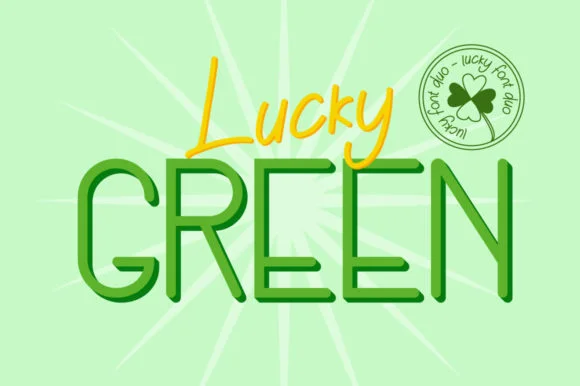
1 / 7About Lucky Green Duo Font
This pairing balances modern confidence with refined elegance. Lucky Green Duo from attypestudio combines a striking sans-serif with a graceful script, offering two complementary voices in one package.
The sans-serif works beautifully for clean, contemporary layouts while the script adds personality exactly where you need visual impact. Wedding invitation suites gain real depth and dimension when the script frames formal details against the sans-serif's structured baseline, creating instant sophistication in every announcement. Fashion brand identity systems thrive on this exact pairing, establishing both approachability and the feeling of crafted polish. Magazine mastheads and pull quotes spring to life with the script's flowing character, while the sans keeps your grid organized and steady. Luxury product packaging labels especially shine, where the script's hand-drawn warmth communicates careful craft while the sans conveys quiet confidence in your brand.
For text-heavy layouts, pair Lucky Green Duo with a minimal geometric sans for body copy, letting both fonts handle everything from headlines to accent work without visual friction. The script's elegance combined with the sans's clarity gives you strong visual options for every design decision you face. You'll find it on Creative Fabrica and start discovering all the unexpected ways this pairing strengthens your creative work.
Style & Use Cases
- Overall Style
- Elegant, Flowing, San Serif
- Use Case
- Invitations, Branding
- Ideal For
- wedding stationery, greeting cards, and signatures
- Pairs With
- a simple uppercase sans
How to Install Lucky Green Duo Font Font
Step-by-step instructions for every platform
- 1Download the Lucky Green Duo Font font file (.ttf or .otf).
- 2Locate the downloaded file in your Downloads folder.
- 3Right-click the font file.
- 4Select "Install" to install for the current user, or "Install for all users" to make it available system-wide.
- 5Lucky Green Duo Font is now available in Word, Photoshop, Illustrator, and all other apps.
More by attypestudio
View all →

Browse fonts by theme
Curated collections →Saw a font in a picture? Identify any font from an image with our free Font Finder.
More Script Handwritten Fonts
Browse all →







What pairs well with Lucky Green Duo Font?
Lucky Green Duo Font is a script font that shines as a display or heading face. Pair it with a clean sans-serif or serif font for body text — the contrast creates a clear hierarchy while the two styles stay balanced and easy to read.




Lucky Green Duo Font
by attypestudio
Reviewed by the FontBoxDL team · Updated June 2026