 Firefox
 1 / 3
1 / 3Loading font…
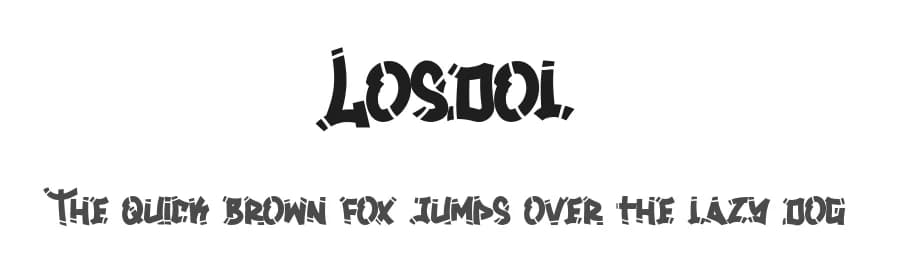
About Losdol Font
Hi Fellow Designers,
Please note that this font is for personal use only and No Commercial use Allowed!, If you want to use this font for Commercial use, you need to purchase a Commercial license here :
https://typotopia.co/product/losdol/
You can also Find Great Freebies Font in Our site, Just Simply Check our site here :
https://typotopia.co/freebies/
If you need a Custom License please Never Hesitate to contact us at :
[email protected]
You can also visit our Official Store for more Awesome Fonts Collection :
https://typotopia.co/
Thank you
--------------------------------------------------------
NOTE : This Font is Demo Only, You Can found which License that suitable with you need by checking this links :
https://typotopia.co/license/
--------------------------------------------------------
For Our Fellow Indonesian
Font demo ini hanya dapat digunakan untuk keperluan "Personal Use"/Kebutuhan Pribadi. Dimohon Untuk Tidak Menggunakan atau memanfaatkan font ini untuk kepeluan Komersial, baik itu untuk Iklan, Promosi, TV, Film, Video, Motion Graphics, Youtube, Desain kaos distro atau untuk Kemasan Produk (baik Fisik ataupun Digital) atau Media apapun dengan tujuan menghasilkan Profit/Keuntungan.
More...
Untuk Keperluan Komersial, Silakan gunakan Lisensi Komersial dengan membeli melalui link ini :
https://typotopia.co/product/volantis/
Anda Dapat memeriksa Lisensi Mana yg anda Butuhkan dengan mengunjungi tautan ini :
https://typotopia.co/license/
Atau teman-teman bisa menghubungi tim kami di email berikut :
[email protected]
Terima Kasih
Style & Use Cases
- Overall Style
- Elegant, Flowing, Script
- Use Case
- Invitations, Branding
- Ideal For
- wedding stationery, greeting cards, and signatures
- Pairs With
- a simple uppercase sans
Similar Fonts
Fonts that look visually alike — matched by our Font Finder model.


Losdol Specifications
| Font Family | Losdol |
| Style | Regular |
| Full Name | Losdol |
| Version | 1.000 |
| Weight | 400 (Regular) |
| Glyph Count | 187 glyphs |
| PostScript Name | Losdol |
| Designer | Khusnun Irawan |
| Format | TTF (TrueType) |
| File Size | 92.4 KB |
Languages Supported
Losdol supports 217 languages.
How to Install Losdol Font
Step-by-step instructions for every platform
- 1Download the Losdol font file (.ttf or .otf).
- 2Locate the downloaded file in your Downloads folder.
- 3Right-click the font file.
- 4Select "Install" to install for the current user, or "Install for all users" to make it available system-wide.
- 5Losdol is now available in Word, Photoshop, Illustrator, and all other apps.
More by Typotopia Studio
View all →

Browse fonts by theme
Curated collections →Saw a font in a picture? Identify any font from an image with our free Font Finder.
More Script Handwritten Fonts
Browse all →







What pairs well with Losdol Font?
Losdol Font is a script font that shines as a display or heading face. Pair it with a clean sans-serif or serif font for body text — the contrast creates a clear hierarchy while the two styles stay balanced and easy to read.



Premium Script Handwritten Fonts
★ PremiumWant something with more weights, glyphs, and commercial polish? These premium script handwritten fonts are worth a look.

Losdol Font
Reviewed by the FontBoxDL team · Updated July 2026
License: Free for personal use