 Firefox
 1 / 7
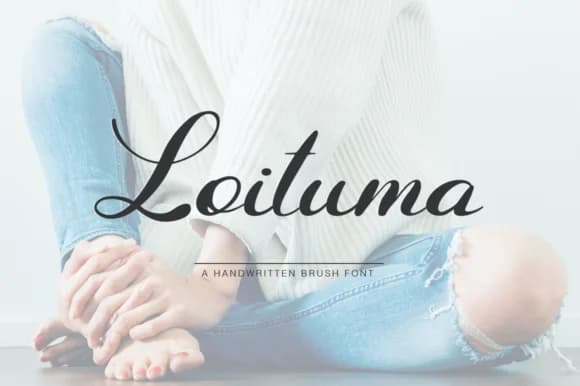
1 / 7About Loituma Font
Loituma by Pasha Larin is an elegant handwritten script that brings authentic, flowing character to any creative project. With its smooth letterforms and distinctly organic aesthetic, this font works beautifully across diverse applications and mediums. From designing custom wedding invitations and formal stationery suites to creating boutique logo designs and luxury packaging labels for artisan brands, Loituma adapts effortlessly between digital and print formats. The font's fluid brush-like strokes make it particularly effective for personal branding materials, artistic social media graphics, and decorative typography applications where genuine warmth and authenticity help establish stronger emotional connections with audiences.
Whether you're crafting handmade-style event announcements for special occasions, designing indie craft product labels for Etsy shops, or developing a distinctive brand identity for creative service businesses, Loituma delivers consistent visual elegance through its carefully-drawn character set. The font maintains excellent readability across various sizes and works seamlessly in both headline-focused and body text applications when paired with complementary typefaces. Its natural adaptability appeals to designers, creative entrepreneurs, and business owners seeking a distinctive signature script that stands apart from generic alternatives and brings warmth to every project. Get Loituma on Creative Fabrica to add this elegant handwritten script to your growing font collection.
Style & Use Cases
- Overall Style
- Elegant, Flowing, Loituma
- Use Case
- Invitations, Branding
- Ideal For
- wedding stationery, greeting cards, and signatures
- Pairs With
- a simple uppercase sans
How to Install Loituma Font Font
Step-by-step instructions for every platform
- 1Download the Loituma Font font file (.ttf or .otf).
- 2Locate the downloaded file in your Downloads folder.
- 3Right-click the font file.
- 4Select "Install" to install for the current user, or "Install for all users" to make it available system-wide.
- 5Loituma Font is now available in Word, Photoshop, Illustrator, and all other apps.
More by Pasha Larin
View all →
Browse fonts by theme
Curated collections →Saw a font in a picture? Identify any font from an image with our free Font Finder.
More Script Handwritten Fonts
Browse all →







What pairs well with Loituma Font?
Loituma Font is a script font that shines as a display or heading face. Pair it with a clean sans-serif or serif font for body text — the contrast creates a clear hierarchy while the two styles stay balanced and easy to read.



Loituma Font
by Pasha Larin
Reviewed by the FontBoxDL team · Updated May 2026