 Firefox
 1 / 8
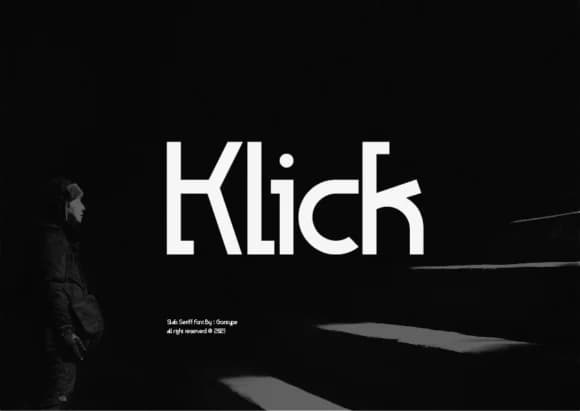
1 / 8About Klick Font
Picture yourself sketching a logo mark for a craft brewery, or setting type for an upscale restaurant menu. Klick, designed by Grontype, is a slab serif that proves weight doesn't need ornamentation to have impact. The letterforms are built on clean, straightforward geometry, but there's genuine character in how each shape relates to its neighbors. You get a typeface that feels both modern and grounded, confident without any sense of overstatement.
This slab works beautifully across luxury product labels, editorial mastheads, and promotional materials where headlines need to command attention. It handles bold brand marks and poster design with equal ease, and it scales gracefully down to packaging for artisanal goods. The condensed width gives you flexibility when space is tight, while the full family supports everything from large display sizes to body text roles. Nothing feels forced or purely decorative. The strength comes straight from structure, which is exactly what good type should do.
What makes this work is its restraint. Every element serves the letterforms themselves. It performs equally well whether you're using it compressed into tight spaces or enlarging it for bold headlines. Find Klick on Creative Fabrica when you're ready to work with a typeface built for actual design solutions.
Style & Use Cases
- Overall Style
- Sturdy, Confident, Slab Font
- Use Case
- Headlines, Merch
- Ideal For
- vintage posters, logos, and product packaging
- Pairs With
- a light sans-serif
How to Install Klick Font
Step-by-step instructions for every platform
- 1Download the Klick font file (.ttf or .otf).
- 2Locate the downloaded file in your Downloads folder.
- 3Right-click the font file.
- 4Select "Install" to install for the current user, or "Install for all users" to make it available system-wide.
- 5Klick is now available in Word, Photoshop, Illustrator, and all other apps.
More by Grontype
View all →
Browse fonts by theme
Curated collections →Saw a font in a picture? Identify any font from an image with our free Font Finder.
More Slab Serif Fonts
Browse all →







What pairs well with Klick Font?
Klick Font is a slab serif font that shines as a display or heading face. Pair it with a clean sans-serif or serif font for body text — the contrast creates a clear hierarchy while the two styles stay balanced and easy to read.



Klick Font
by Grontype
Reviewed by the FontBoxDL team · Updated September 2026