 Firefox
 1 / 9
1 / 9About Kidplay Font
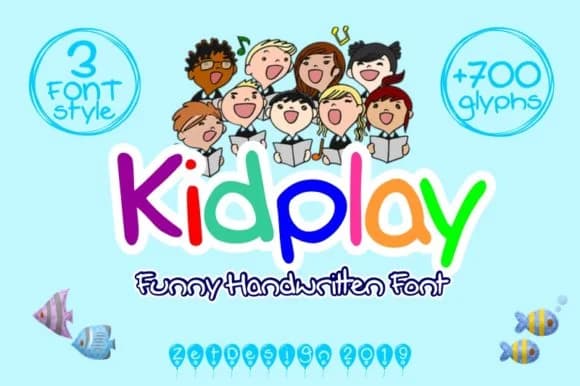
This font captures that irreverent, slightly off-kilter energy kids bring to everything they touch. Kidplay, designed by ZetDesign, is a handwritten script that balances genuine playfulness with an oddly cool edge that keeps it from feeling saccharine. There's a natural looseness here, something you'd recognize from marker on paper, but with enough control that it reads as intentional rather than accidental.
Perfect for children's book covers, DIY birthday party invitations, comic-style poster designs, and vintage-inspired toy packaging labels. Each letter carries that sketchy, organic quality, grounding the design in something tactile and real rather than purely digital. The quirky construction, with its irregular letterforms and unexpected angle shifts, gives designs genuine character without needing heavy illustration or extra layers of detail to support it.
What makes this font genuinely useful is how it balances playfulness without trying too hard. The weird twist in the letterforms adds visual interest that engages without becoming a distraction or gimmick. Pair Kidplay with a clean, geometric sans-serif for body text or longer copy, and you'll get the contrast that lets both fonts work together in service of your design. Get it from Creative Fabrica and start putting this playful voice to work in your projects.
Style & Use Cases
- Overall Style
- Elegant, Flowing, Cool
- Use Case
- Invitations, Branding
- Ideal For
- wedding stationery, greeting cards, and signatures
- Pairs With
- a simple uppercase sans
How to Install Kidplay Font Font
Step-by-step instructions for every platform
- 1Download the Kidplay Font font file (.ttf or .otf).
- 2Locate the downloaded file in your Downloads folder.
- 3Right-click the font file.
- 4Select "Install" to install for the current user, or "Install for all users" to make it available system-wide.
- 5Kidplay Font is now available in Word, Photoshop, Illustrator, and all other apps.

Browse fonts by theme
Curated collections →Saw a font in a picture? Identify any font from an image with our free Font Finder.
More Script Handwritten Fonts
Browse all →







What pairs well with Kidplay Font?
Kidplay Font is a script font that shines as a display or heading face. Pair it with a clean sans-serif or serif font for body text — the contrast creates a clear hierarchy while the two styles stay balanced and easy to read.



Kidplay Font
by ZetDesign
Reviewed by the FontBoxDL team · Updated August 2026