 Firefox
 1 / 5
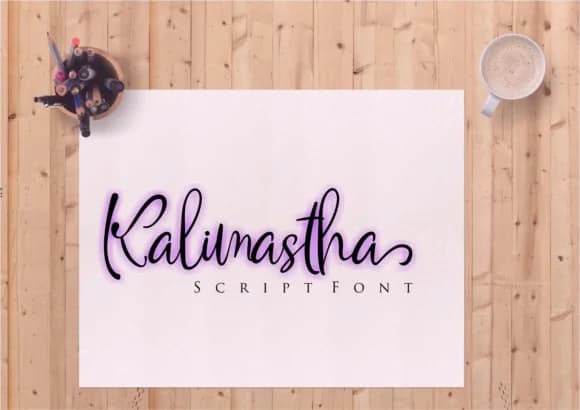
1 / 5About Kalimastha Font
Kalimastha by Lettercorner Studio is a playful script that brings flowing, hand-drawn elegance to digital design. With its natural calligraphy strokes and personable character, this font transforms everyday projects into visually engaging pieces that feel artfully crafted rather than templated.
This typeface shines in applications where warmth and personality matter most. Consider it for wedding invitation suites where couples seek a distinctive voice, rustic event programs that benefit from character-driven typography, boutique packaging for handmade skincare or artisan goods, and social media graphics that need to stand out in crowded feeds. Lettercorner Studio designed Kalimastha with versatility in mind, making it equally at home as a headline for creative business branding or as a supporting element in greeting card layouts.
The font's playful energy doesn't sacrifice legibility, making it practical for extended use in short passages while maintaining the aesthetic appeal of hand-lettering. Whether you're crafting DIY signage for a pop-up shop, designing book covers for indie publishers, or developing cohesive brand collateral for small creative enterprises, Kalimastha adapts gracefully. Add it to your typography toolkit and unlock a font that brings warmth and intentionality to projects that deserve a personal touch. Start creating with Kalimastha on Creative Fabrica today.
Style & Use Cases
- Overall Style
- Elegant, Flowing, Kalimastha
- Use Case
- Invitations, Branding
- Ideal For
- wedding stationery, greeting cards, and signatures
- Pairs With
- a simple uppercase sans
How to Install Kalimastha Font Font
Step-by-step instructions for every platform
- 1Download the Kalimastha Font font file (.ttf or .otf).
- 2Locate the downloaded file in your Downloads folder.
- 3Right-click the font file.
- 4Select "Install" to install for the current user, or "Install for all users" to make it available system-wide.
- 5Kalimastha Font is now available in Word, Photoshop, Illustrator, and all other apps.
More by Lettercorner Studio
View all →

Browse fonts by theme
Curated collections →Saw a font in a picture? Identify any font from an image with our free Font Finder.
More Script Handwritten Fonts
Browse all →







What pairs well with Kalimastha Font?
Kalimastha Font is a script font that shines as a display or heading face. Pair it with a clean sans-serif or serif font for body text — the contrast creates a clear hierarchy while the two styles stay balanced and easy to read.



Kalimastha Font
Reviewed by the FontBoxDL team · Updated May 2026