 Firefox
 1 / 8
1 / 8About Kaliedophone Font
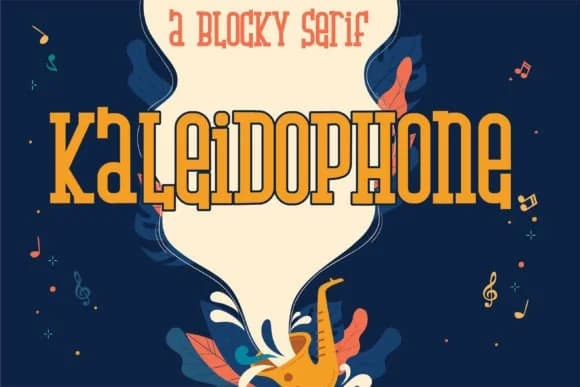
Kaliedophone by Illustration Ink is a stocky, hand-crafted slab serif with a deliberately compressed height that gives it bold, assertive presence on the page. The lowercase letters feature no descenders, keeping everything anchored to a uniform baseline, which proves ideal for layouts where you need strong visual weight without compromising vertical space. Its hand-drawn construction brings authentic character that digital fonts rarely capture, with each letter feeling individually crafted rather than algorithmically generated. That human touch resonates throughout the entire character set, making every word feel personally made.
This typeface shines for vintage poster designs, craft beer bottle labels, board game packaging, and indie comic covers where personality matters most. The strong letterforms pair beautifully with rustic café signage, greeting card interiors, and hand-lettered product packaging. You'll find it particularly effective for boutique skincare labels and DIY craft projects where a homemade sensibility strengthens brand identity and customer connection. Small print remains legible thanks to the squat proportions, while the hand-drawn quality adds warmth that polished geometric fonts simply can't match. Restaurant menus, vintage sticker designs, and handmade book covers all benefit from Kaliedophone's distinctive, memorable voice.
Get Kaliedophone on Creative Fabrica and add this distinctive slab serif to your working font library.
Style & Use Cases
- Overall Style
- Sturdy, Confident, Slab Serif
- Use Case
- Headlines, Merch
- Ideal For
- vintage posters, logos, and product packaging
- Pairs With
- a light sans-serif
How to Install Kaliedophone Font
Step-by-step instructions for every platform
- 1Download the Kaliedophone font file (.ttf or .otf).
- 2Locate the downloaded file in your Downloads folder.
- 3Right-click the font file.
- 4Select "Install" to install for the current user, or "Install for all users" to make it available system-wide.
- 5Kaliedophone is now available in Word, Photoshop, Illustrator, and all other apps.
More by Illustration Ink
View all →



Browse fonts by theme
Curated collections →Saw a font in a picture? Identify any font from an image with our free Font Finder.
More Slab Serif Fonts
Browse all →







What pairs well with Kaliedophone Font?
Kaliedophone Font is a slab serif font that shines as a display or heading face. Pair it with a clean sans-serif or serif font for body text — the contrast creates a clear hierarchy while the two styles stay balanced and easy to read.



Kaliedophone Font
Reviewed by the FontBoxDL team · Updated September 2026