 Firefox
 1 / 5
1 / 5About Jelly Doughnut Font
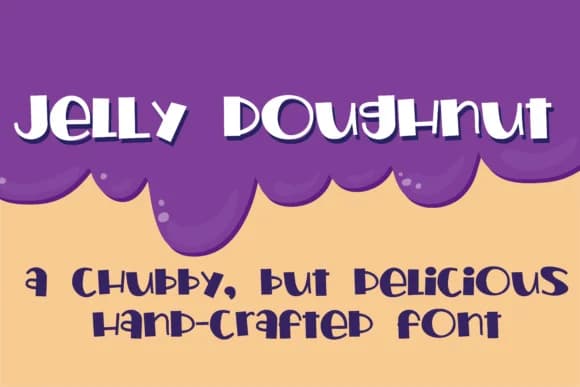
Jelly Doughnut by Illustration Ink is a rounded, playful script typeface that balances bold letterforms with dramatic dynamic weight variations throughout the character set. The striking contrast between thick and thin strokes creates visual rhythm and momentum across headlines while remaining legible enough for extended body copy passages, making it an unusually versatile choice for diverse typographic design work. The font's inherently chubby, approachable character brings distinctive personality and warmth to any layout without ever feeling overly formal or corporate in tone.
This typeface truly shines in applications like children's picture book covers, festive greeting card suites, boutique bakery packaging designs, and whimsical event invitations and announcements. Its rounded forms and tonal shifts make it particularly effective for creating eye-catching product labels on handmade goods, specialty food items, or artisanal confectionery packaging projects. The typeface also excels in social media graphics, decorative poster layouts, DIY craft projects, and hand-lettered signage where warmth, charm, and personality matter significantly more than rigid formality or minimalist aesthetics. Whether designing branded packaging, illustrative book pages, or seasonal celebration materials, this rounded script adapts beautifully to both formal and playful contexts.
Discover Jelly Doughnut Font on Creative Fabrica and bring this versatile, personality-filled typeface into your creative collection.
Style & Use Cases
- Overall Style
- Elegant, Flowing, Jelly Doughnut
- Use Case
- Invitations, Branding
- Ideal For
- wedding stationery, greeting cards, and signatures
- Pairs With
- a simple uppercase sans
How to Install Jelly Doughnut Font Font
Step-by-step instructions for every platform
- 1Download the Jelly Doughnut Font font file (.ttf or .otf).
- 2Locate the downloaded file in your Downloads folder.
- 3Right-click the font file.
- 4Select "Install" to install for the current user, or "Install for all users" to make it available system-wide.
- 5Jelly Doughnut Font is now available in Word, Photoshop, Illustrator, and all other apps.
More by Illustration Ink
View all →



Browse fonts by theme
Curated collections →Saw a font in a picture? Identify any font from an image with our free Font Finder.
More Script Handwritten Fonts
Browse all →







What pairs well with Jelly Doughnut Font?
Jelly Doughnut Font is a script font that shines as a display or heading face. Pair it with a clean sans-serif or serif font for body text — the contrast creates a clear hierarchy while the two styles stay balanced and easy to read.



Jelly Doughnut Font
Reviewed by the FontBoxDL team · Updated May 2026