 Firefox
 1 / 9
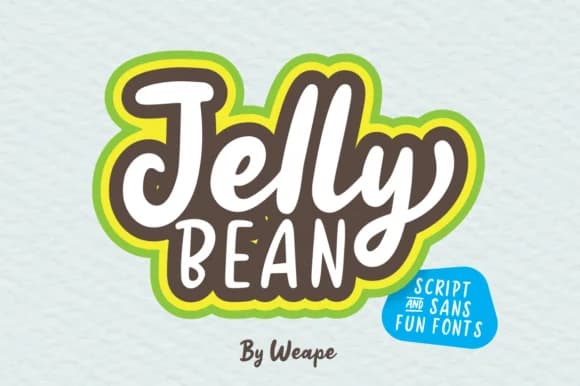
1 / 9About Jelly Bean Font
Jelly Bean by Weape Design is a hand-lettered typeface that brings playful charm and personality to contemporary lettering projects. The font comes in dual versions, both script and sans styles, offering distinctive flexibility for designers seeking cohesive yet visually dynamic compositions. Each iteration maintains the characteristic whimsy that makes this typeface ideal for wedding invitation suites, artisan candy packaging labels, children's book illustrations, and DIY craft stickers. The harmonious pairing of script and sans works seamlessly for mixed-media projects where you want smooth integration between decorative display elements and functional typography. Whether you're developing boutique greeting cards, creating social media graphics with personality, or designing product labels for small businesses, Jelly Bean adapts beautifully to projects requiring warmth, approachability, and visual interest without sacrificing legibility. The versatility of combining these two complementary styles allows creators to establish clear visual hierarchy while maintaining a consistent, recognizable design voice throughout their entire composition. The hand-lettered quality remains authentically present in both versions, preserving that personal, approachable character that distinguishes Jelly Bean from typical mass-produced typeface families. Find Jelly Bean on Creative Fabrica and start combining both styles in your next lettering project.
Style & Use Cases
- Overall Style
- Elegant, Flowing, Jelly Bean
- Use Case
- Invitations, Branding
- Ideal For
- wedding stationery, greeting cards, and signatures
- Pairs With
- a simple uppercase sans
How to Install Jelly Bean Font Font
Step-by-step instructions for every platform
- 1Download the Jelly Bean Font font file (.ttf or .otf).
- 2Locate the downloaded file in your Downloads folder.
- 3Right-click the font file.
- 4Select "Install" to install for the current user, or "Install for all users" to make it available system-wide.
- 5Jelly Bean Font is now available in Word, Photoshop, Illustrator, and all other apps.
More by Weape Design
View all →
Browse fonts by theme
Curated collections →Saw a font in a picture? Identify any font from an image with our free Font Finder.
More Script Handwritten Fonts
Browse all →







What pairs well with Jelly Bean Font?
Jelly Bean Font is a script font that shines as a display or heading face. Pair it with a clean sans-serif or serif font for body text — the contrast creates a clear hierarchy while the two styles stay balanced and easy to read.



Jelly Bean Font
by Weape Design
Reviewed by the FontBoxDL team · Updated May 2026