 Firefox
 1 / 8
1 / 8About Instine Font
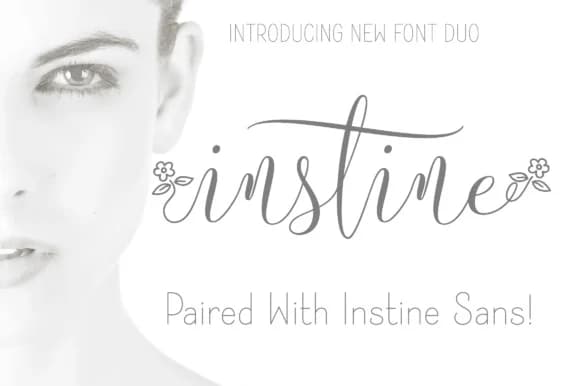
Instine by Royaltype is a delicate thin script that brings refined elegance to contemporary design work. This handwritten-style typeface features graceful letterforms with natural swash elements and subtle variations, complemented by a matching thin sans serif companion for versatile typographic pairing. The combination of both styles opens creative possibilities across multiple design disciplines while maintaining visual cohesion.
Perfect for high-end applications like luxury beauty product labels, personalized wedding invitation suites, boutique cosmetic packaging, and bespoke stationery projects, Instine delivers that sophisticated hand-lettered touch without compromising legibility. The thin weight creates a distinctly modern aesthetic while maintaining the warmth of handwritten typography that contemporary brands crave. Artistic event programs, music-themed designs, and artisanal packaging all benefit from its refined character. The dual font system lets designers experiment with strategic complementary pairing, mixing the script for eye-catching headlines with the sans serif for supporting text, body copy, and information blocks to create cohesive visual hierarchies. This flexibility makes it valuable for both display and functional typographic applications.
Whether you're crafting sophisticated brand collateral, personal creative projects, or professional design work, Instine offers the elegance and technical versatility that modern design demands. The combination of script beauty and sans serif functionality makes it an unusually complete solution for designers working across multiple project types. Find this distinctive typeface on Creative Fabrica to enhance your typographic toolkit.
Style & Use Cases
- Overall Style
- Elegant, Flowing, Thin Script Cursive Font
- Use Case
- Invitations, Branding
- Ideal For
- wedding stationery, greeting cards, and signatures
- Pairs With
- a simple uppercase sans
How to Install Instine Font Font
Step-by-step instructions for every platform
- 1Download the Instine Font font file (.ttf or .otf).
- 2Locate the downloaded file in your Downloads folder.
- 3Right-click the font file.
- 4Select "Install" to install for the current user, or "Install for all users" to make it available system-wide.
- 5Instine Font is now available in Word, Photoshop, Illustrator, and all other apps.


Browse fonts by theme
Curated collections →Saw a font in a picture? Identify any font from an image with our free Font Finder.
More Script Handwritten Fonts
Browse all →







What pairs well with Instine Font?
Instine Font is a script font that shines as a display or heading face. Pair it with a clean sans-serif or serif font for body text — the contrast creates a clear hierarchy while the two styles stay balanced and easy to read.



Instine Font
by Royaltype
Reviewed by the FontBoxDL team · Updated May 2026