
 1 / 8
1 / 8About IanSegoe Font
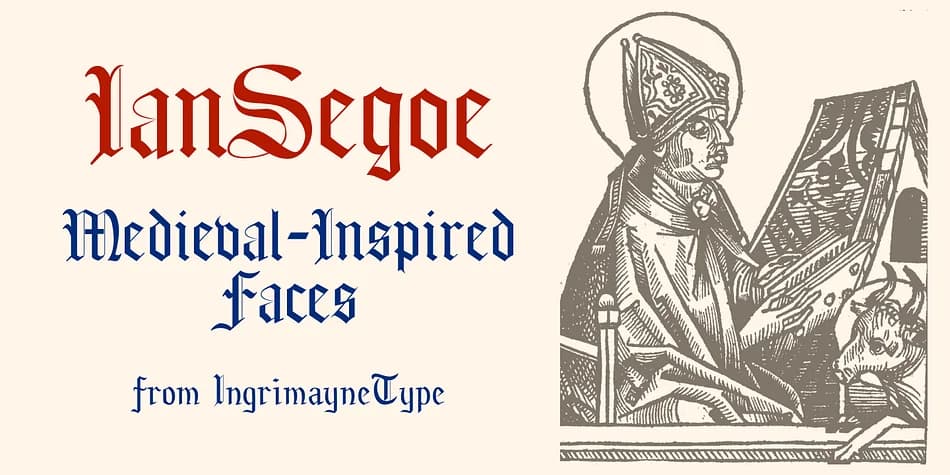
This blackletter typeface captures the shadowy drama of medieval scripts, drawing you into a gothic atmosphere that feels historically grounded. IanSegoe, designed by Ingrimayne Type, emerged in the early 1990s as one of the designer's first explorations into authentic period letterforms. The typeface is available as two distinct variations, each offering its own visual character and distinct purpose.
What makes it particularly useful is the structural duality built into the core design. The uppercase letters remain consistent across both versions, though with subtle differences, while the lowercase characters are completely different from one face to the other. This dual structure works beautifully for wedding invitation suites with gothic aesthetics, historical fiction book covers, fantasy game branding, and medieval-themed event collateral. You get two distinct tones from a single package, which means you can shift the mood without hunting for another typeface entirely.
Pair IanSegoe with a crisp sans-serif typeface for body text or accent passages. The clean counterbalance allows the ornate lettering to breathe and shine without overwhelming other important elements on the page. Find it on Creative Fabrica and start exploring what those two distinctive faces can offer for your next period-inspired project.
Style & Use Cases
- Overall Style
- Ornate, Gothic
- Use Case
- Logos, Certificates
- Ideal For
- medieval themes, band merch, and tattoo lettering
- Pairs With
- a clean sans-serif for body text
How to Install IanSegoe Font
Step-by-step instructions for every platform
- 1Download the IanSegoe font file (.ttf or .otf).
- 2Locate the downloaded file in your Downloads folder.
- 3Right-click the font file.
- 4Select "Install" to install for the current user, or "Install for all users" to make it available system-wide.
- 5IanSegoe is now available in Word, Photoshop, Illustrator, and all other apps.
More by Ingrimayne Type
View all →

Browse fonts by theme
Curated collections →Saw a font in a picture? Identify any font from an image with our free Font Finder.
More Blackletter Fonts
Browse all →







What pairs well with IanSegoe Font?
IanSegoe Font is a blackletter font that shines as a display or heading face. Pair it with a clean serif or sans-serif font for body text — the contrast creates a clear hierarchy while the two styles stay balanced and easy to read.



IanSegoe Font
Reviewed by the FontBoxDL team · Updated June 2026