 Firefox
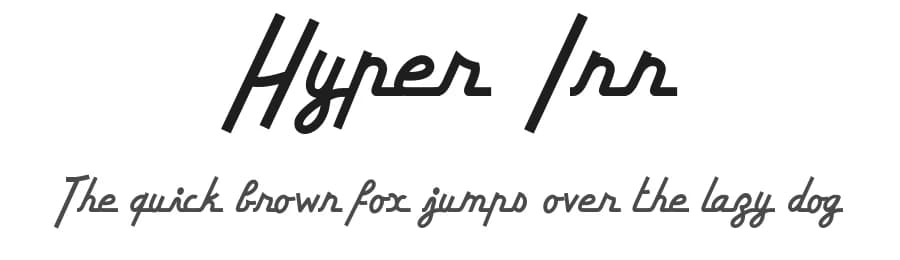 1 / 3
1 / 3Loading font…
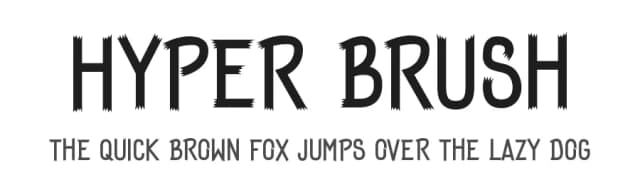
About Hyper Inn Font
Hyper Inn is a script-handwritten typeface designed by Bisou that brings an old-school, energetic character to contemporary design work. With 211 glyphs supporting 211+ Latin-based languages, it delivers the hand-drawn warmth of classic script lettering without sacrificing technical versatility or international accessibility.
The font's handwritten personality makes it particularly effective for vintage-inspired branding systems, retro poster designs, album artwork and record labels, and nostalgic product packaging that demands authenticity. Its old-school roots suit anyone looking to evoke genuine craft and character, whether designing a coffee shop menu with period-appropriate typography, creating vintage vinyl record sleeves, developing authentic brand identity for heritage-focused businesses, or producing nostalgic marketing materials. The consistent Regular weight provides clear readability across sizes while maintaining the organic flow that distinguishes handwritten scripts from more formal, engineered typefaces. Each letterform carries the energy of mid-century script traditions, making it ideal for projects where you need lettering that feels personally drawn rather than mechanically generated.
Available as a free download from this page with licence terms available there; do not claim commercial rights. It works best when you want genuine vintage character without mechanical sterility. Choose Hyper Inn over safer default typefaces when your project specifically calls for the hand-crafted energy of classic script lettering, where perfect uniformity would undermine the design's authenticity and period-appropriate feel.
Style & Use Cases
- Overall Style
- Elegant, Flowing, Script
- Use Case
- Invitations, Branding
- Ideal For
- wedding stationery, greeting cards, and signatures
- Pairs With
- a simple uppercase sans
Similar Fonts
Fonts that look visually alike — matched by our Font Finder model.


Hyper Inn Specifications
| Font Family | Hyper Inn |
| Style | Regular |
| Full Name | Hyper Inn |
| Version | 1.000 |
| Weight | 400 (Regular) |
| Glyph Count | 211 glyphs |
| PostScript Name | HyperInnRegular |
| Format | TTF (TrueType) |
| File Size | 73.4 KB |
OpenType Features
Hyper Inn ships with 1 OpenType feature you can switch on in apps that support them (Illustrator, InDesign, Affinity, Figma, CSS font-feature-settings).
- Standard ligatures
Languages Supported
Hyper Inn supports 211 languages.
How to Install Hyper Inn Font
Step-by-step instructions for every platform
- 1Download the Hyper Inn font file (.ttf or .otf).
- 2Locate the downloaded file in your Downloads folder.
- 3Right-click the font file.
- 4Select "Install" to install for the current user, or "Install for all users" to make it available system-wide.
- 5Hyper Inn is now available in Word, Photoshop, Illustrator, and all other apps.
Browse fonts by theme
Curated collections →Saw a font in a picture? Identify any font from an image with our free Font Finder.
More Script Handwritten Fonts
Browse all →







What pairs well with Hyper Inn Font?
Hyper Inn Font is a script font that shines as a display or heading face. Pair it with a clean sans-serif or serif font for body text — the contrast creates a clear hierarchy while the two styles stay balanced and easy to read.



Premium Script Handwritten Fonts
★ PremiumWant something with more weights, glyphs, and commercial polish? These premium script handwritten fonts are worth a look.

Hyper Inn Font
by Bisou
Reviewed by the FontBoxDL team · Updated October 2026
License: Donationware