 Firefox
 1 / 9
1 / 9About Homegarden Duo Font
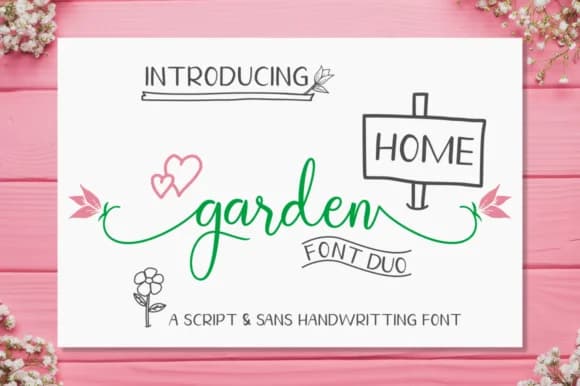
The Homegarden Duo Font by kammaqsum brings loose, flowing letterforms with generous swashes and playful doodle elements that infuse instant personality and movement into any layout. As a two-font set, it pairs a more refined script with a looser, more expressive companion version, giving you options depending on how much character the design calls for. Both versions maintain readable proportions while keeping that handmade, organic feel that distinguishes them from clinical typefaces.
This handwritten typeface really shines on wedding invitation suites where decorative flair is expected and valued, greeting card designs that need warmth and genuine personality, product label design for small-batch cosmetics or artisan food goods, and custom event signage. The doodle components integrate especially well layered into compositions, letting you add flourishes and visual texture without hunting for separate graphics or embellishments. The script reads as genuinely handwritten rather than digital, which matters for projects meant to feel intimate and considered. Design-conscious makers and small-business owners love fonts like this because they dramatically cut production time while keeping finished work feeling authentically handcrafted and personal.
Homegarden is an excellent choice for anyone looking to add real character and warmth to brand projects or personal work. Grab it on Creative Fabrica and start bringing genuine personality to your designs.
Style & Use Cases
- Overall Style
- Elegant, Flowing, Homegarden
- Use Case
- Invitations, Branding
- Ideal For
- wedding stationery, greeting cards, and signatures
- Pairs With
- a simple uppercase sans
How to Install Homegarden Duo Font Font
Step-by-step instructions for every platform
- 1Download the Homegarden Duo Font font file (.ttf or .otf).
- 2Locate the downloaded file in your Downloads folder.
- 3Right-click the font file.
- 4Select "Install" to install for the current user, or "Install for all users" to make it available system-wide.
- 5Homegarden Duo Font is now available in Word, Photoshop, Illustrator, and all other apps.
Browse fonts by theme
Curated collections →Saw a font in a picture? Identify any font from an image with our free Font Finder.
More Script Handwritten Fonts
Browse all →







What pairs well with Homegarden Duo Font?
Homegarden Duo Font is a script font that shines as a display or heading face. Pair it with a clean sans-serif or serif font for body text — the contrast creates a clear hierarchy while the two styles stay balanced and easy to read.



Homegarden Duo Font
by kammaqsum
Reviewed by the FontBoxDL team · Updated June 2026