 Firefox
 1 / 9
1 / 9About Hokagata Brush Font
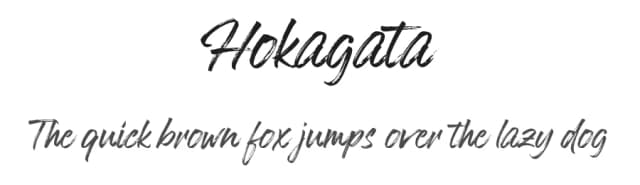
This font captures the energy of a brush moving quickly across paper, with that raw, gestural quality that makes handwriting feel genuinely alive on the page. Hokagata Brush, created by Fargun Studio, brings authentic character to any design that needs more personality than a standard typeface can offer. The quick, dry strokes give it a loose, confident feel, like handwriting from someone with strong technique and complete control.
The font excels at wedding invitation suites, where its warmth sets an elegant tone without feeling formal or distant. It's equally well-suited to artisan product packaging, boutique cosmetics labels, and hand-lettered craft signage on small-batch goods. You might also reach for it for restaurant menus, personal stationery, or as a standout text layer over photography in branding work. The collection comes as two font files: Hokagata Brush delivers the main typeface with uppercase, lowercase, numerals, and comprehensive punctuation for everyday use, while Hokagata Swash provides 64 additional hand-drawn flourishes and decorative alternates that can underscore or accent your text with extra flair.
To keep layouts balanced and readable, pair Hokagata Brush with a restrained geometric sans-serif for any body text or supporting copy. Both fonts are available right now on Creative Fabrica.
Style & Use Cases
- Overall Style
- Elegant, Flowing
- Use Case
- Invitations, Branding
- Ideal For
- wedding stationery, greeting cards, and signatures
- Pairs With
- a simple uppercase sans
How to Install Hokagata Brush Font
Step-by-step instructions for every platform
- 1Download the Hokagata Brush font file (.ttf or .otf).
- 2Locate the downloaded file in your Downloads folder.
- 3Right-click the font file.
- 4Select "Install" to install for the current user, or "Install for all users" to make it available system-wide.
- 5Hokagata Brush is now available in Word, Photoshop, Illustrator, and all other apps.
More by Fargun Studio
View all →
Browse fonts by theme
Curated collections →Saw a font in a picture? Identify any font from an image with our free Font Finder.
More Script Handwritten Fonts
Browse all →







What pairs well with Hokagata Brush Font?
Hokagata Brush Font is a script font that shines as a display or heading face. Pair it with a clean sans-serif or serif font for body text — the contrast creates a clear hierarchy while the two styles stay balanced and easy to read.



Hokagata Brush Font
Reviewed by the FontBoxDL team · Updated July 2026