 Firefox
 1 / 7
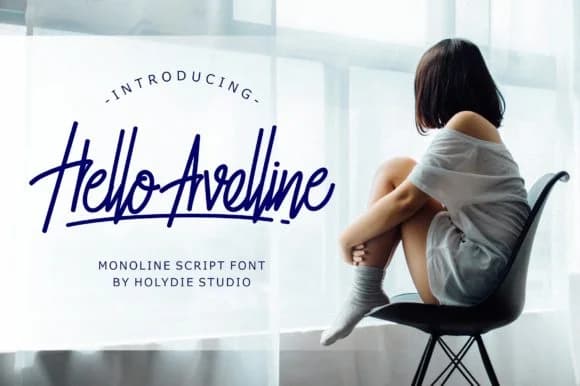
1 / 7About Hello Avelline Font
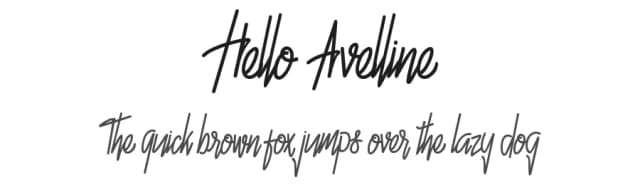
Hello Avelline from Holydie Studio strikes a balance between informal fluidity and clean precision with its monoline letterforms. The consistent stroke weight throughout gives the script a contemporary feel that works equally well in casual and professional contexts. This is a font that breathes on the page, its flowing characters carrying personality without sacrificing legibility even at smaller sizes.
The real strength of Hello Avelline lies in its versatility across different visual applications. Wedding invitation suites benefit from its warm, approachable character, as do social media graphics where legibility matters on small screens. Product labels for independent boutiques, handmade beauty brands, and artisan goods all gain credibility from this font's handcrafted yet polished aesthetic. Personalized greeting cards, event menu cards, and custom signage also showcase its particular charm, letting the letterforms be the focal point without competing against other design elements for attention.
For brand identity work where personality and accessibility matter equally, Hello Avelline delivers consistent results across application types. The font's even stroke weight makes it reliable for both print and digital contexts. New business positioning or visual language refreshes both benefit from its balance of sophistication and approachability. Find it on Creative Fabrica and add it to your collection.
Style & Use Cases
- Overall Style
- Elegant, Flowing, Hello Avelline
- Use Case
- Invitations, Branding
- Ideal For
- wedding stationery, greeting cards, and signatures
- Pairs With
- a simple uppercase sans
How to Install Hello Avelline Font Font
Step-by-step instructions for every platform
- 1Download the Hello Avelline Font font file (.ttf or .otf).
- 2Locate the downloaded file in your Downloads folder.
- 3Right-click the font file.
- 4Select "Install" to install for the current user, or "Install for all users" to make it available system-wide.
- 5Hello Avelline Font is now available in Word, Photoshop, Illustrator, and all other apps.
More by Holydie Studio
View all →

Browse fonts by theme
Curated collections →Saw a font in a picture? Identify any font from an image with our free Font Finder.
More Script Handwritten Fonts
Browse all →







What pairs well with Hello Avelline Font?
Hello Avelline Font is a script font that shines as a display or heading face. Pair it with a clean sans-serif or serif font for body text — the contrast creates a clear hierarchy while the two styles stay balanced and easy to read.



Hello Avelline Font
Reviewed by the FontBoxDL team · Updated June 2026