 Firefox
 1 / 8
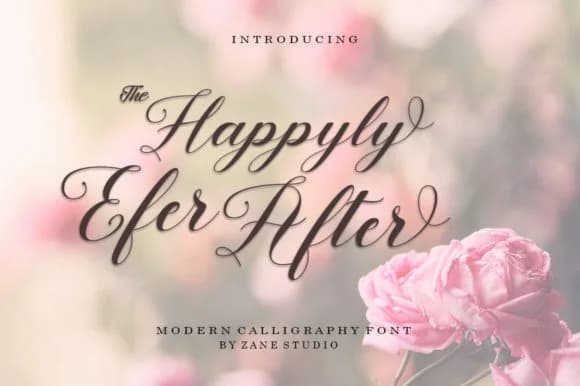
1 / 8About Happyly Ever After Font
Picture yourself laying out a wedding invitation suite, and you need that handwritten charm without the amateurish spacing issues that plague many script fonts. Happyly Ever After, designed by Zane Studio, delivers exactly that balance. This script has a loose, bouncy baseline that reads as genuinely written rather than mechanically perfect, making it ideal for custom engagement announcements, personalized gift tags, wine label designs, and boutique skincare packaging where clients expect organic character and hand-drawn warmth.
The real advantage lies in the contextual alternates for beginning and end letters. Your opening flourishes and closing swashes will feel intentional and varied, never falling into repetition even across longer passages. Language support spans multiple regions too, which opens doors if you're working with international stationery brands or producing bilingual invitations and branded materials for global clients. That kind of flexibility matters in real project work.
The irregular baseline hits hardest at large display sizes, where that movement and character genuinely add visual interest instead of reading as sloppiness. When you need personality and movement over rigid perfection, this font delivers something most other scripts can't quite match. Happyly Ever After is available on Creative Fabrica.
Style & Use Cases
- Overall Style
- Elegant, Flowing, Happyly Ever After
- Use Case
- Invitations, Branding
- Ideal For
- wedding stationery, greeting cards, and signatures
- Pairs With
- a simple uppercase sans
How to Install Happyly Ever After Font Font
Step-by-step instructions for every platform
- 1Download the Happyly Ever After Font font file (.ttf or .otf).
- 2Locate the downloaded file in your Downloads folder.
- 3Right-click the font file.
- 4Select "Install" to install for the current user, or "Install for all users" to make it available system-wide.
- 5Happyly Ever After Font is now available in Word, Photoshop, Illustrator, and all other apps.
More by Zane Studio
View all →
Browse fonts by theme
Curated collections →Saw a font in a picture? Identify any font from an image with our free Font Finder.
More Script Handwritten Fonts
Browse all →







What pairs well with Happyly Ever After Font?
Happyly Ever After Font is a script font that shines as a display or heading face. Pair it with a clean sans-serif or serif font for body text — the contrast creates a clear hierarchy while the two styles stay balanced and easy to read.



Happyly Ever After Font
by Zane Studio
Reviewed by the FontBoxDL team · Updated June 2026