 Firefox
 1 / 9
1 / 9About Happy Clover Family Font
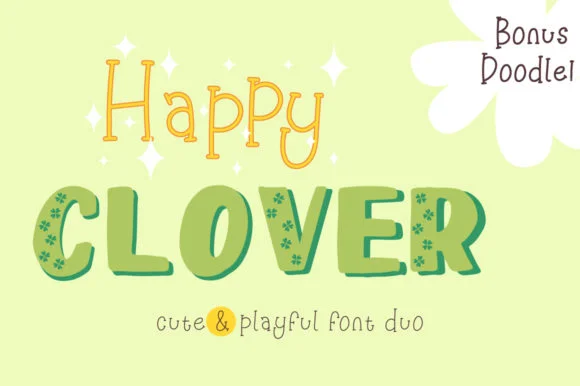
The Happy Clover Family Font by attypestudio combines chunky hand-drawn letterforms with decorative patterned details built directly into each character. This playful font duo blends bold slab serif structure with genuine hand-sketched qualities that feel inviting, warm, and approachable. Rather than sterile or purely digital, the letters themselves carry real visual personality, making text pop without requiring additional embellishment, overlays, or supporting design work.
This font duo truly shines across projects where playful character matters. You'll want it for Saint Patrick's Day themed cards and signage, children's birthday party invitations and decorations, handmade gift labels and craft packaging, scrapbook layouts demanding visual impact, and DIY project signage. A collection of bonus doodles included in both EPS and AI vector formats adds extra graphical elements for layering and composition. The thick, bold weight keeps text readable in any setting, from headlines and longer passages to individual letterforms used purely as decorative graphics.
For makers and designers building projects aimed at kids and festive occasions, this font family delivers genuine personality and visual warmth alongside legibility. You'll find the Happy Clover Family Font on Creative Fabrica, ready to bring hand-drawn charm and character to your next creation.
Style & Use Cases
- Overall Style
- Elegant, Flowing, Slab
- Use Case
- Invitations, Branding
- Ideal For
- wedding stationery, greeting cards, and signatures
- Pairs With
- a simple uppercase sans
How to Install Happy Clover Family Font Font
Step-by-step instructions for every platform
- 1Download the Happy Clover Family Font font file (.ttf or .otf).
- 2Locate the downloaded file in your Downloads folder.
- 3Right-click the font file.
- 4Select "Install" to install for the current user, or "Install for all users" to make it available system-wide.
- 5Happy Clover Family Font is now available in Word, Photoshop, Illustrator, and all other apps.
More by attypestudio
View all →


Browse fonts by theme
Curated collections →Saw a font in a picture? Identify any font from an image with our free Font Finder.
More Script Handwritten Fonts
Browse all →







What pairs well with Happy Clover Family Font?
Happy Clover Family Font is a script font that shines as a display or heading face. Pair it with a clean sans-serif or serif font for body text — the contrast creates a clear hierarchy while the two styles stay balanced and easy to read.




Happy Clover Family Font
by attypestudio
Reviewed by the FontBoxDL team · Updated June 2026