 Firefox
 1 / 5
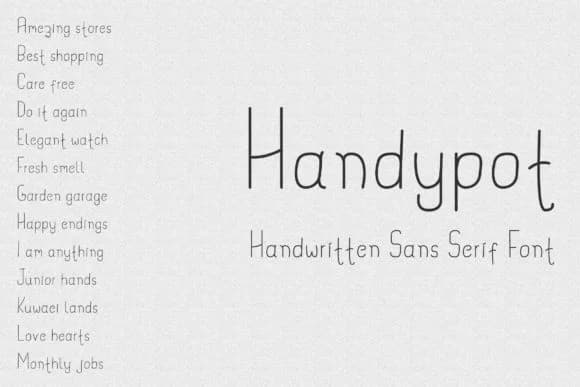
1 / 5About Handypot Font
Handypot, designed by Dasagani, is a monoline script with a genuinely casual feel that doesn't sacrifice readability. The letterforms carry an unpretentious, hand-drawn character. Each stroke hits with consistent weight throughout, giving the alphabet a clean, uncluttered appearance that works equally well at small sizes or blown up larger.
This is the kind of typeface that fits naturally into projects where warmth and approachability matter more than formality. Consider it for children's book covers and interior pages, DIY birthday invitation sets that still look thoughtful rather than thrown together, app interfaces that need personality without visual noise, and custom labels on handmade goods sold through Etsy or at craft fairs. The monoline structure keeps letterforms legible even when space is tight, while the casual personality prevents anything from feeling sterile or overly designed.
Projects aimed at young audiences and casual branding work are where Handypot shines brightest. It won't overwhelm a page and always reads clearly, making it a straightforward choice for designers who want to add character without adding complexity to their work. The font sits comfortably alongside other casual typefaces but never gets lost in a layout. Find it on Creative Fabrica and let it bring a friendly presence to your next project.
Style & Use Cases
- Overall Style
- Elegant, Flowing, Handypot
- Use Case
- Invitations, Branding
- Ideal For
- wedding stationery, greeting cards, and signatures
- Pairs With
- a simple uppercase sans
How to Install Handypot Font Font
Step-by-step instructions for every platform
- 1Download the Handypot Font font file (.ttf or .otf).
- 2Locate the downloaded file in your Downloads folder.
- 3Right-click the font file.
- 4Select "Install" to install for the current user, or "Install for all users" to make it available system-wide.
- 5Handypot Font is now available in Word, Photoshop, Illustrator, and all other apps.
Browse fonts by theme
Curated collections →Saw a font in a picture? Identify any font from an image with our free Font Finder.
More Script Handwritten Fonts
Browse all →







What pairs well with Handypot Font?
Handypot Font is a script font that shines as a display or heading face. Pair it with a clean sans-serif or serif font for body text — the contrast creates a clear hierarchy while the two styles stay balanced and easy to read.



Handypot Font
by Dasagani
Reviewed by the FontBoxDL team · Updated May 2026