 Firefox
 1 / 9
1 / 9About Hailuna Font
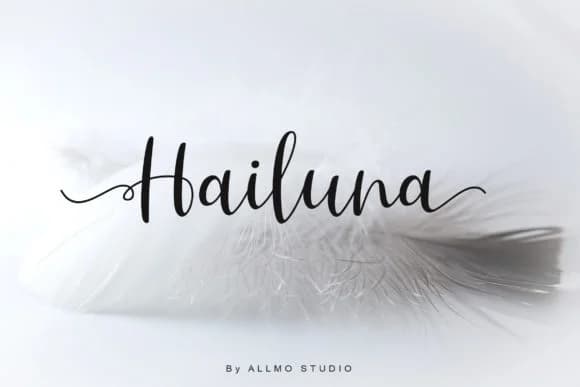
You're laying out an upscale wedding invitation suite and need something that feels both modern and refined. Hailuna, a contemporary script from AllmoStudio, fits that moment perfectly. The font's dancing baseline and flowing forms create movement without sacrificing legibility, while its decorative character set gives you extra flourishes to play with when the moment calls for them.
This typeface works beautifully across multiple branding contexts: high-end cosmetics packaging, boutique fashion tags, custom event stationery, personalized gift labels, handmade greeting cards, and those intricate Etsy product photographs where every detail counts. The letterforms dance across the baseline in a way that reads as sophisticated rather than playful, striking a balance that works in both formal and creative applications. When paired with a clean sans-serif for body text, you'll notice how the script handles larger display sizes without losing its refined character.
Its decorative alternates give you real flexibility when you need variation across a design system or want to add polish to key words and headers. If you're building a visual identity that needs warmth and personality without feeling loose or unprofessional, Hailuna does both. Get it from Creative Fabrica to explore what it can do for your next project.
Style & Use Cases
- Overall Style
- Elegant, Flowing, Hailuna
- Use Case
- Invitations, Branding
- Ideal For
- wedding stationery, greeting cards, and signatures
- Pairs With
- a simple uppercase sans
How to Install Hailuna Font Font
Step-by-step instructions for every platform
- 1Download the Hailuna Font font file (.ttf or .otf).
- 2Locate the downloaded file in your Downloads folder.
- 3Right-click the font file.
- 4Select "Install" to install for the current user, or "Install for all users" to make it available system-wide.
- 5Hailuna Font is now available in Word, Photoshop, Illustrator, and all other apps.
More by AllmoStudio
View all →

Browse fonts by theme
Curated collections →Saw a font in a picture? Identify any font from an image with our free Font Finder.
More Script Handwritten Fonts
Browse all →







What pairs well with Hailuna Font?
Hailuna Font is a script font that shines as a display or heading face. Pair it with a clean sans-serif or serif font for body text — the contrast creates a clear hierarchy while the two styles stay balanced and easy to read.



Hailuna Font
by AllmoStudio
Reviewed by the FontBoxDL team · Updated May 2026