 Firefox
 1 / 5
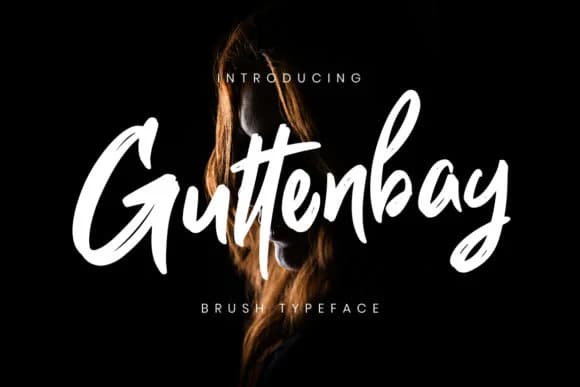
1 / 5About Guttenbay Font
Picture yourself designing a wedding invitation suite, something that feels genuinely handwritten yet maintains perfect readability at smaller sizes. CreatypeStudio crafted Guttenbay as an ultra-smooth brush script that solves this exact tension. The font captures what a skilled hand-letterer produces with a real brush pen, but without the brittleness that makes many script typefaces unworkable at smaller scales. Its bold weight keeps characters crisp and distinct even when they flow together, which is what separates a truly usable brush font from a purely ornamental one.
This typeface excels on luxury packaging labels for artisan cosmetics, specialty coffee blends, and handmade soap brands. Greeting card suites gain instant sophistication from its flowing letterforms, and event poster designs benefit from confident stroke work that feels alive rather than mechanical. Wine labels and boutique stationery covers work equally well, delivering that handmade quality with professional polish. Anywhere you need authentic character without sacrificing readability, Guttenbay delivers.
The font performs best when given breathing room at larger display sizes, where the subtle variation in stroke width becomes part of its appeal. Its consistent brushwork handles smaller applications reasonably well too, maintaining legibility where many similar scripts stumble. Grab Guttenbay on Creative Fabrica and watch it become a reliable choice for projects that demand personality with precision.
Style & Use Cases
- Overall Style
- Elegant, Flowing, Guttenbay
- Use Case
- Invitations, Branding
- Ideal For
- wedding stationery, greeting cards, and signatures
- Pairs With
- a simple uppercase sans
How to Install Guttenbay Font Font
Step-by-step instructions for every platform
- 1Download the Guttenbay Font font file (.ttf or .otf).
- 2Locate the downloaded file in your Downloads folder.
- 3Right-click the font file.
- 4Select "Install" to install for the current user, or "Install for all users" to make it available system-wide.
- 5Guttenbay Font is now available in Word, Photoshop, Illustrator, and all other apps.
More by CreatypeStudio
View all →
Browse fonts by theme
Curated collections →Saw a font in a picture? Identify any font from an image with our free Font Finder.
More Script Handwritten Fonts
Browse all →







What pairs well with Guttenbay Font?
Guttenbay Font is a script font that shines as a display or heading face. Pair it with a clean sans-serif or serif font for body text — the contrast creates a clear hierarchy while the two styles stay balanced and easy to read.



Guttenbay Font
Reviewed by the FontBoxDL team · Updated May 2026