
 1 / 6
1 / 6About Growth Period Font
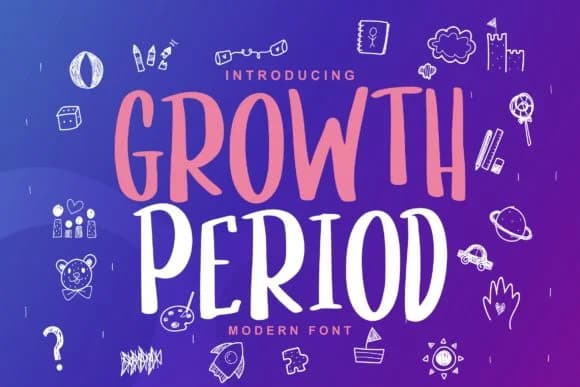
This font feels like genuine handwriting, raw and organic without trying too hard. Growth Period, designed by Vunira, is a handwritten script built on irregular letterforms that keep every stroke feeling natural rather than mechanically produced.
Character irregularities and baseline shifts make this typeface work especially well for projects where authenticity carries real weight. Personal branding benefits from that human touch, particularly for independent designers, freelance illustrators, and small creative studios looking to stand out from cookie-cutter alternatives. You'll find it performing beautifully across wedding invitation suites, artist portfolio headers, DIY craft labels for handmade products, sticker designs for Etsy shops, and event signage where imperfect letterforms add genuine charm rather than reading as mistakes. What makes the variation so effective isn't randomness. Those subtle width shifts and baseline wobbles signal handmade quality in a way your customers unconsciously notice and respond to, even if they can't articulate exactly why they prefer it.
Pair Growth Period with a clean, geometric sans-serif like Montserrat to anchor layouts and let the script take center stage. Organic irregularity paired with structural precision creates visual interest without feeling chaotic. Grab it from Creative Fabrica when you're ready to add that authentic handwritten voice to your next project.
Style & Use Cases
- Overall Style
- Elegant, Flowing, Growth Period
- Use Case
- Invitations, Branding
- Ideal For
- wedding stationery, greeting cards, and signatures
- Pairs With
- a simple uppercase sans
How to Install Growth Period Font Font
Step-by-step instructions for every platform
- 1Download the Growth Period Font font file (.ttf or .otf).
- 2Locate the downloaded file in your Downloads folder.
- 3Right-click the font file.
- 4Select "Install" to install for the current user, or "Install for all users" to make it available system-wide.
- 5Growth Period Font is now available in Word, Photoshop, Illustrator, and all other apps.
Browse fonts by theme
Curated collections →Saw a font in a picture? Identify any font from an image with our free Font Finder.
More Script Handwritten Fonts
Browse all →







What pairs well with Growth Period Font?
Growth Period Font is a script font that shines as a display or heading face. Pair it with a clean sans-serif or serif font for body text — the contrast creates a clear hierarchy while the two styles stay balanced and easy to read.



Growth Period Font
by Vunira
Reviewed by the FontBoxDL team · Updated September 2026