
 1 / 8
1 / 8About GRAVEBLADE Font
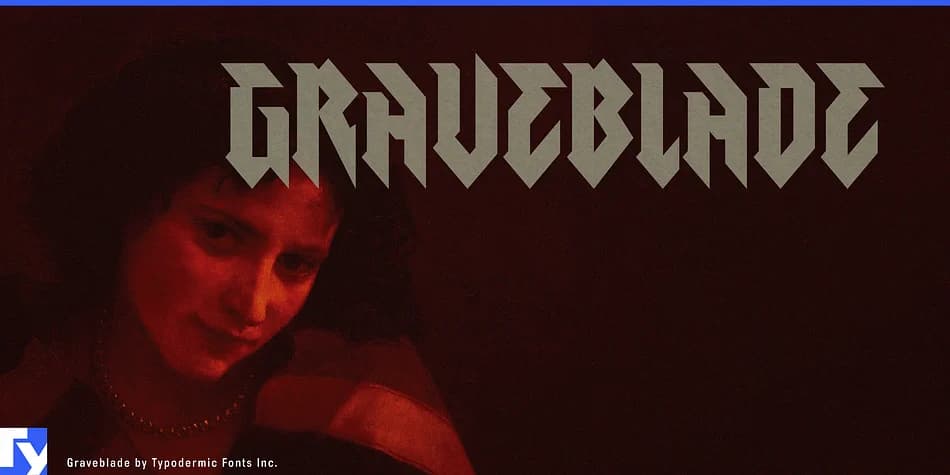
Picture a concert poster for a death metal band or the title card for a horror film. Graveblade, a blackletter typeface from Typodermic Fonts Inc., is what lands there, bringing the kind of visual weight that stops people in their tracks but in no friendly way. It's built purely to intimidate.
Sharp, knife-edge strokes give the design its aggressive character. Each letter looks hewn rather than drawn, which makes it ideal for album artwork, metal band logos, and haunted attraction signage where designs need to feel physically dangerous and commanding. Dark fantasy book covers, occult branding projects, tattoo flash designs, and concert posters all benefit from its refusal to be likeable or approachable. That's exactly why it works so well in these specific spaces. There's no compromise in the structure, no softening of the edges.
Graveblade supports a broad range of Latin-based languages, ensuring your message travels across borders without losing its bite. The design maintains its visual edge at large display sizes and smaller applications alike, staying readable even at unusual scales. You'll notice how the strokes command immediate attention no matter the context. Grab Graveblade on Creative Fabrica and bring this uncompromising intensity to your next project.
Style & Use Cases
- Overall Style
- Ornate, Gothic
- Use Case
- Logos, Certificates
- Ideal For
- medieval themes, band merch, and tattoo lettering
- Pairs With
- a clean sans-serif for body text
How to Install GRAVEBLADE Font
Step-by-step instructions for every platform
- 1Download the GRAVEBLADE font file (.ttf or .otf).
- 2Locate the downloaded file in your Downloads folder.
- 3Right-click the font file.
- 4Select "Install" to install for the current user, or "Install for all users" to make it available system-wide.
- 5GRAVEBLADE is now available in Word, Photoshop, Illustrator, and all other apps.
More by Typodermic Fonts Inc.
View all →
Browse fonts by theme
Curated collections →Saw a font in a picture? Identify any font from an image with our free Font Finder.
More Blackletter Fonts
Browse all →







What pairs well with GRAVEBLADE Font?
GRAVEBLADE Font is a blackletter font that shines as a display or heading face. Pair it with a clean serif or sans-serif font for body text — the contrast creates a clear hierarchy while the two styles stay balanced and easy to read.



GRAVEBLADE Font
Reviewed by the FontBoxDL team · Updated June 2026