 Firefox
 1 / 7
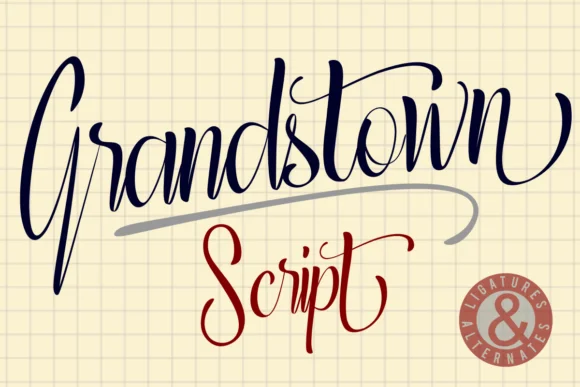
1 / 7About Grandstown Script Font
Grandstown Script is a stunning handwritten font. It is PUA encoded which means you can access all of the glyphs and swashes with ease! It features a varying baseline, smooth lines, gorgeous glyphs and stunning alternates. It maintains its classy calligraphic influences while feeling contemporary and fresh. Fall in love with this font and bring your projects to the highest levels!
Style & Use Cases
- Overall Style
- Elegant, Flowing, Calligraphy
- Use Case
- Invitations, Branding
- Ideal For
- wedding stationery, greeting cards, and signatures
- Pairs With
- a simple uppercase sans
How to Install Grandstown Script Font Font
Step-by-step instructions for every platform
- 1Download the Grandstown Script Font font file (.ttf or .otf).
- 2Locate the downloaded file in your Downloads folder.
- 3Right-click the font file.
- 4Select "Install" to install for the current user, or "Install for all users" to make it available system-wide.
- 5Grandstown Script Font is now available in Word, Photoshop, Illustrator, and all other apps.
More by Deedeetype
View all →
Browse fonts by theme
Curated collections →Saw a font in a picture? Identify any font from an image with our free Font Finder.
More Script Handwritten Fonts
Browse all →







What pairs well with Grandstown Script Font?
Grandstown Script Font is a script font that shines as a display or heading face. Pair it with a clean sans-serif or serif font for body text — the contrast creates a clear hierarchy while the two styles stay balanced and easy to read.




Grandstown Script Font
by Deedeetype
Reviewed by the FontBoxDL team · Updated May 2026