
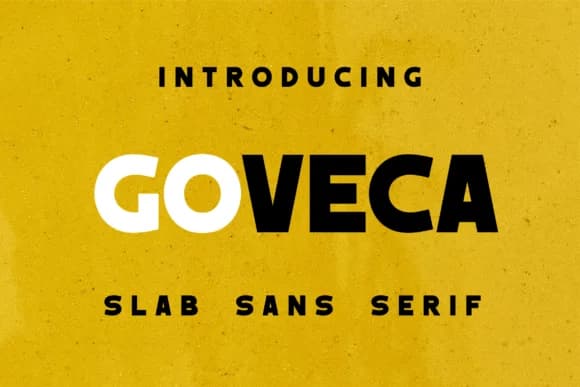
 1 / 7
1 / 7About Goveca Font
Goveca, designed by Monoletter, is a geometric slab serif typeface built on the principle that modern design doesn't require decoration to achieve impact. Its letterforms are constructed with bold proportions and clean curves that convey confidence through structure alone. This is typography that communicates assurance without needing to perform.
The font excels wherever authority and clarity need to work together. Use it for tech startup logos and brand systems where a single letterform sets the tone for an entire company, luxury packaging design for jewelry or cosmetics where precision and personality coexist, restaurant menus and signage that establish atmosphere through typography, or large magazine headlines where a single line has to anchor the whole spread. App interfaces benefit from its balanced proportions, which stay legible in tight spaces without sacrificing character. Setting text at 72 points on a poster or 16 points in a web interface, Goveca maintains the same structural confidence. That consistency across scales is what makes it invaluable for designers building complete brand systems rather than one-off pieces.
This is the typeface for designers and brands that refuse generic solutions and want real substance behind their typography. Get Goveca on Creative Fabrica and start building identities with genuine typographic backbone.
Style & Use Cases
- Overall Style
- Sturdy, Confident, Goveca
- Use Case
- Headlines, Merch
- Ideal For
- vintage posters, logos, and product packaging
- Pairs With
- a light sans-serif
How to Install Goveca Font
Step-by-step instructions for every platform
- 1Download the Goveca font file (.ttf or .otf).
- 2Locate the downloaded file in your Downloads folder.
- 3Right-click the font file.
- 4Select "Install" to install for the current user, or "Install for all users" to make it available system-wide.
- 5Goveca is now available in Word, Photoshop, Illustrator, and all other apps.
More by Monoletter
View all →

Browse fonts by theme
Curated collections →Saw a font in a picture? Identify any font from an image with our free Font Finder.
More Slab Serif Fonts
Browse all →







What pairs well with Goveca Font?
Goveca Font is a slab serif font that shines as a display or heading face. Pair it with a clean sans-serif or serif font for body text — the contrast creates a clear hierarchy while the two styles stay balanced and easy to read.



Goveca Font
by Monoletter
Reviewed by the FontBoxDL team · Updated August 2026