 Firefox
 1 / 9
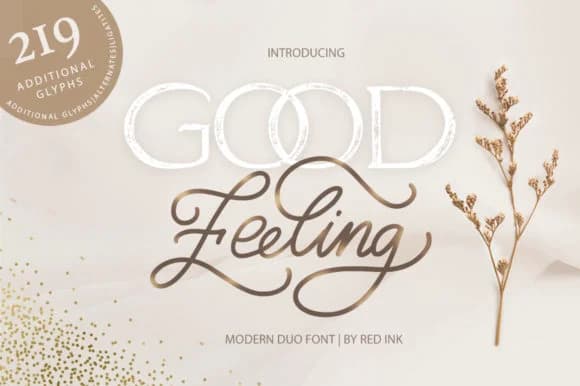
1 / 9About Good Feeling Font
Good Feeling Font by Red Ink is a light script duo that brings a personal, human touch to any project where elegance and warmth matter equally. The two weights work together beautifully, giving you flexibility for headlines and supporting text without sacrificing that handwritten quality that makes people stop and pay attention.
This typeface shines on wedding invitation suites where you need sophistication without formality or stiffness. You'll also find it works wonderfully for greeting card designs, especially when the message needs to feel intimate rather than commercial or mass-produced. Boutique packaging labels (think small-batch skincare or artisan candles) are another ideal application, as is social media graphics that benefit from a gentle, approachable voice. Even DIY wedding signage gains polish when rendered in this script.
The light weight keeps everything from feeling too heavy or over-designed, which matters when you're working with layouts that need breathing room. Pair the two weights strategically and you maintain visual coherence across your project while adding personality at multiple hierarchy levels. If you're building a brand identity that skews toward crafted or handmade sensibilities, this duo deserves a close look. Grab Good Feeling Font on Creative Fabrica and see what it brings to your next project.
Style & Use Cases
- Overall Style
- Elegant, Flowing, Good Feeling
- Use Case
- Invitations, Branding
- Ideal For
- wedding stationery, greeting cards, and signatures
- Pairs With
- a simple uppercase sans
How to Install Good Feeling Font Font
Step-by-step instructions for every platform
- 1Download the Good Feeling Font font file (.ttf or .otf).
- 2Locate the downloaded file in your Downloads folder.
- 3Right-click the font file.
- 4Select "Install" to install for the current user, or "Install for all users" to make it available system-wide.
- 5Good Feeling Font is now available in Word, Photoshop, Illustrator, and all other apps.
Browse fonts by theme
Curated collections →Saw a font in a picture? Identify any font from an image with our free Font Finder.
More Script Handwritten Fonts
Browse all →







What pairs well with Good Feeling Font?
Good Feeling Font is a script font that shines as a display or heading face. Pair it with a clean sans-serif or serif font for body text — the contrast creates a clear hierarchy while the two styles stay balanced and easy to read.



Good Feeling Font
by Red Ink
Reviewed by the FontBoxDL team · Updated August 2026