 Firefox
 1 / 8
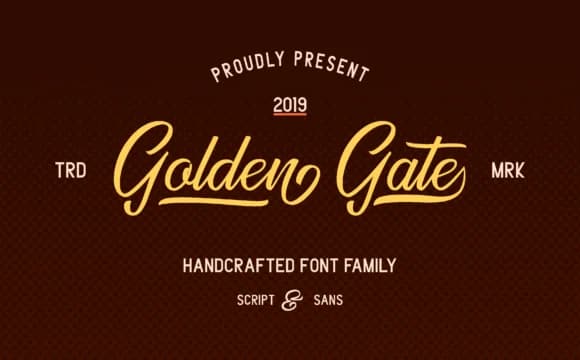
1 / 8About Golden Gate Duo Font
Golden Gate Duo Font by Adriansyah pairs a confident sans typeface with a flowing script, building flexibility into a single family. This dual-version approach gives you both structural strength and organic movement, which is harder to find when you're building a brand system around a single typeface. The two styles feel connected rather than clashing because they share the same proportional logic and visual relationships.
Wedding invitation suites shine with this pairing, using the sans for the formal announcement and the script for names or opening lines. Product labels for artisanal items like craft beverages, handmade skincare, or boutique candles all benefit from the script's organic character without sacrificing readability when you need to include ingredients or small details. Small business logos often need both a solid, readable version for signage or digital use and a more decorative option for printed collateral, and the Golden Gate family delivers both in one purchase. The sans version handles business cards, website headers, and interior signage where clarity drives the design decisions. Packaging designers particularly appreciate having both versions available for layering or emphasis without needing to hunt through multiple typeface families.
Grab Golden Gate Duo Font on Creative Fabrica and start working these complementary styles into your next brand project.
Style & Use Cases
- Overall Style
- Elegant, Flowing, Golden Gate
- Use Case
- Invitations, Branding
- Ideal For
- wedding stationery, greeting cards, and signatures
- Pairs With
- a simple uppercase sans
How to Install Golden Gate Duo Font Font
Step-by-step instructions for every platform
- 1Download the Golden Gate Duo Font font file (.ttf or .otf).
- 2Locate the downloaded file in your Downloads folder.
- 3Right-click the font file.
- 4Select "Install" to install for the current user, or "Install for all users" to make it available system-wide.
- 5Golden Gate Duo Font is now available in Word, Photoshop, Illustrator, and all other apps.
More by Adriansyah
View all →
Browse fonts by theme
Curated collections →Saw a font in a picture? Identify any font from an image with our free Font Finder.
More Script Handwritten Fonts
Browse all →







What pairs well with Golden Gate Duo Font?
Golden Gate Duo Font is a script font that shines as a display or heading face. Pair it with a clean sans-serif or serif font for body text — the contrast creates a clear hierarchy while the two styles stay balanced and easy to read.



Golden Gate Duo Font
by Adriansyah
Reviewed by the FontBoxDL team · Updated May 2026