 Firefox
 1 / 4
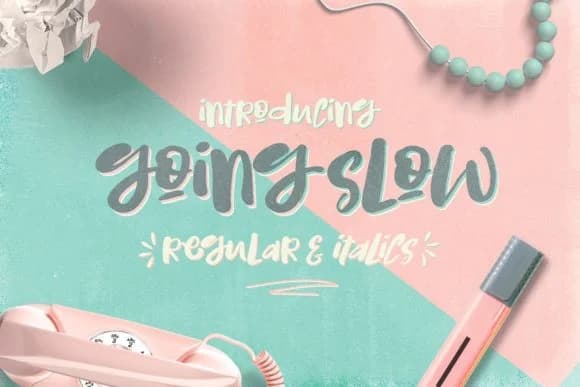
1 / 4About Going Slow Font
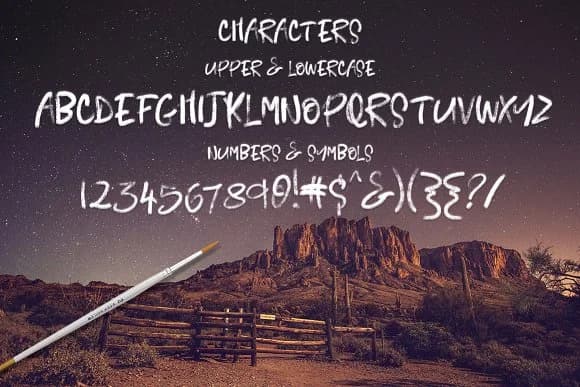
Going Slow Font captures that unhurried, hand-drawn sensibility that feels natural on the page. Creativeqube Design created this script by blending uppercase and lowercase characters so each word can breathe, giving your typography genuine personality instead of the stiff, mechanical feel of most scripts out there. The letterforms have a casual bounce to them, the kind that reads as intentional rather than hasty.
The font works beautifully across wedding invitation suites and personalized stationery, where that handwriting vibe reads as thoughtful and intimate rather than generic. Etsy product labels, boutique skincare packaging, and DIY craft signage are all natural homes for it. You'll also find it shines on greeting cards, hand-lettered social graphics, and small-batch product branding where authenticity matters more than polished perfection. The regular and italic versions let you layer contrast within a single design, switching styles for emphasis without hunting for another typeface.
This one's built for designers who value warmth over formality. When you want typography that feels like it came from a pen and a hand rather than a factory, Going Slow Font delivers. You'll find it on Creative Fabrica.
Style & Use Cases
- Overall Style
- Elegant, Flowing, Going Slow
- Use Case
- Invitations, Branding
- Ideal For
- wedding stationery, greeting cards, and signatures
- Pairs With
- a simple uppercase sans
How to Install Going Slow Font Font
Step-by-step instructions for every platform
- 1Download the Going Slow Font font file (.ttf or .otf).
- 2Locate the downloaded file in your Downloads folder.
- 3Right-click the font file.
- 4Select "Install" to install for the current user, or "Install for all users" to make it available system-wide.
- 5Going Slow Font is now available in Word, Photoshop, Illustrator, and all other apps.
More by Creativeqube Design
View all →
Browse fonts by theme
Curated collections →Saw a font in a picture? Identify any font from an image with our free Font Finder.
More Script Handwritten Fonts
Browse all →







What pairs well with Going Slow Font?
Going Slow Font is a script font that shines as a display or heading face. Pair it with a clean sans-serif or serif font for body text — the contrast creates a clear hierarchy while the two styles stay balanced and easy to read.



Going Slow Font
Reviewed by the FontBoxDL team · Updated June 2026