 Firefox
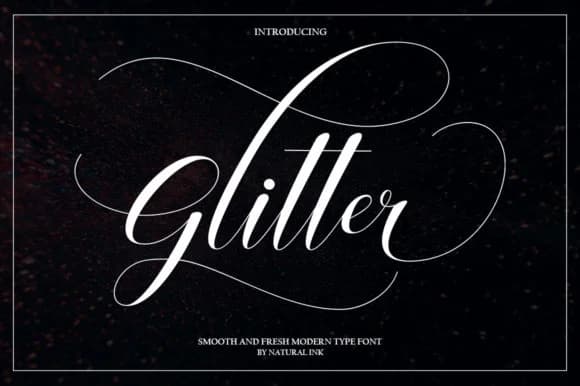 1 / 6
1 / 6About Glitter Script Font by Natural Ink Font
This script radiates luxury and refinement, like handwriting that's been perfected through years of genuine care. Glitter Script Font from Natural Ink brings the elegance of flowing calligraphy to your design work, with those generous, bold swashes that make each letter feel alive, intentional, and impossible to ignore.
The font excels for projects where sophistication is essential and first impressions matter. Use it for wedding invitation suites with layered cardstock and real envelope liners, luxury cosmetics and skincare labeling where every detail signals quality and care, boutique event signage that commands attention in upscale venues, and premium stationery packages designed for creative professionals and small business owners. Its swashes flow with confidence without veering into chaos, striking that balance between artistic expression and genuine usability on the page. Those letterforms draw the eye naturally through their movement, which is exactly what you want when every design decision carries weight and intention.
Pair Glitter Script with a clean, modern sans-serif for supporting text and body copy (this contrast lets the ornate script take its proper place without competing with functional content or overwhelming readers). You'll discover it on Creative Fabrica, where it's ready to bring that refined, handcrafted elegance to your next high-stakes design project.
Style & Use Cases
- Overall Style
- Elegant, Flowing, Glitter
- Use Case
- Invitations, Branding
- Ideal For
- wedding stationery, greeting cards, and signatures
- Pairs With
- a simple uppercase sans
How to Install Glitter Script Font by Natural Ink Font
Step-by-step instructions for every platform
- 1Download the Glitter Script Font by Natural Ink font file (.ttf or .otf).
- 2Locate the downloaded file in your Downloads folder.
- 3Right-click the font file.
- 4Select "Install" to install for the current user, or "Install for all users" to make it available system-wide.
- 5Glitter Script Font by Natural Ink is now available in Word, Photoshop, Illustrator, and all other apps.
More by Natural Ink
View all →

Browse fonts by theme
Curated collections →Saw a font in a picture? Identify any font from an image with our free Font Finder.
More Script Handwritten Fonts
Browse all →







What pairs well with Glitter Script Font by Natural Ink Font?
Glitter Script Font by Natural Ink Font is a script font that shines as a display or heading face. Pair it with a clean sans-serif or serif font for body text — the contrast creates a clear hierarchy while the two styles stay balanced and easy to read.



Glitter Script Font by Natural Ink Font
by Natural Ink
Reviewed by the FontBoxDL team · Updated June 2026