 Firefox
 1 / 9
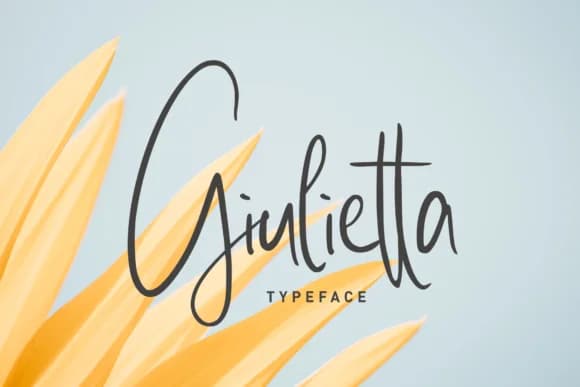
1 / 9About Giulietta Font
Picture a handwritten wedding invitation suite with thick, organic strokes catching light on cream cardstock. Giulietta Font, designed by takoliko, brings that same fluid grace to digital work. Generous curves feel intentional rather than accidental, with every letter balanced between formality and ease. The script reads with restraint, making it perform equally well at large sizes and small, which opens up territory most scripts can't claim. That balance between personality and control is harder to pull off than it looks.
Giulietta finds its sweet spot in high-end stationery design, luxury cosmetics labels, and custom greeting card layouts where legibility matters as much as presence. It also shines on smaller applications: recipe cards, wine bottle tags, personal journal covers, and signage for boutique retail spaces. What sets it apart among handwritten scripts is that restraint in the letterforms. Leaning toward elegance rather than demanding attention, the script pairs cleanly with editorial layouts and simple brand collateral without overwhelming the page. The font gives designers real flexibility in how they deploy it.
Giulietta works strongest when given room to breathe on the page. Its curves anchor heavy layouts without overwhelming the composition. License it on Creative Fabrica to test it across your real projects.
Style & Use Cases
- Overall Style
- Elegant, Flowing
- Use Case
- Invitations, Branding
- Ideal For
- wedding stationery, greeting cards, and signatures
- Pairs With
- a simple uppercase sans
How to Install Giulietta Font Font
Step-by-step instructions for every platform
- 1Download the Giulietta Font font file (.ttf or .otf).
- 2Locate the downloaded file in your Downloads folder.
- 3Right-click the font file.
- 4Select "Install" to install for the current user, or "Install for all users" to make it available system-wide.
- 5Giulietta Font is now available in Word, Photoshop, Illustrator, and all other apps.
More by takoliko
View all →
Browse fonts by theme
Curated collections →Saw a font in a picture? Identify any font from an image with our free Font Finder.
More Script Handwritten Fonts
Browse all →







What pairs well with Giulietta Font?
Giulietta Font is a script font that shines as a display or heading face. Pair it with a clean sans-serif or serif font for body text — the contrast creates a clear hierarchy while the two styles stay balanced and easy to read.



Giulietta Font
by takoliko
Reviewed by the FontBoxDL team · Updated September 2026