 Firefox
 1 / 7
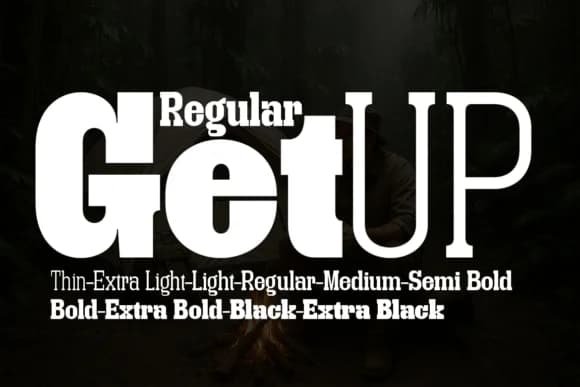
1 / 7About Getup Regular Font
Getup Regular by Artisans is a geometric slab serif that merges bold structural confidence with understated contemporary character. Designed as the balanced core of a 10-weight family spanning Thin to Extra Black, this typeface sits perfectly between the expanded proportions of its wider siblings and the compressed precision of condensed variants.
The Regular weight excels in editorial contexts like magazine mastheads and book covers, where its characteristic squared-off serifs grab attention without sacrificing legibility. It performs equally well on luxury packaging for high-end cosmetics and spirits, corporate identity systems demanding formal authority, and restaurant menu headers where geometric precision signals quality. The typeface maintains consistent optical spacing across all applications, so the Extra Light reads as clearly as the Extra Black.
What makes Getup Regular compelling is how its slab construction communicates a thoroughly contemporary design language while retaining the formal presence that serious professional work requires. The 10-weight system was engineered to function as a cohesive typographic toolkit, never feeling disjointed when moving from Thin through Extra Black. Combine it with clean geometric sans serifs or hand-drawn decorative accents to build distinctive branded systems that feel both structured and organic. Get Getup Regular on Creative Fabrica and start exploring this versatile ten-weight typeface.
Style & Use Cases
- Overall Style
- Sturdy, Confident, Futuristic
- Use Case
- Headlines, Merch
- Ideal For
- vintage posters, logos, and product packaging
- Pairs With
- a light sans-serif
How to Install Getup Regular Font
Step-by-step instructions for every platform
- 1Download the Getup Regular font file (.ttf or .otf).
- 2Locate the downloaded file in your Downloads folder.
- 3Right-click the font file.
- 4Select "Install" to install for the current user, or "Install for all users" to make it available system-wide.
- 5Getup Regular is now available in Word, Photoshop, Illustrator, and all other apps.
More by Artisans
View all →
Browse fonts by theme
Curated collections →Saw a font in a picture? Identify any font from an image with our free Font Finder.
More Slab Serif Fonts
Browse all →







What pairs well with Getup Regular Font?
Getup Regular Font is a slab serif font that shines as a display or heading face. Pair it with a clean sans-serif or serif font for body text — the contrast creates a clear hierarchy while the two styles stay balanced and easy to read.



Getup Regular Font
by Artisans
Reviewed by the FontBoxDL team · Updated August 2026