 Firefox
 1 / 7
1 / 7About Getup Extra Condensed Font
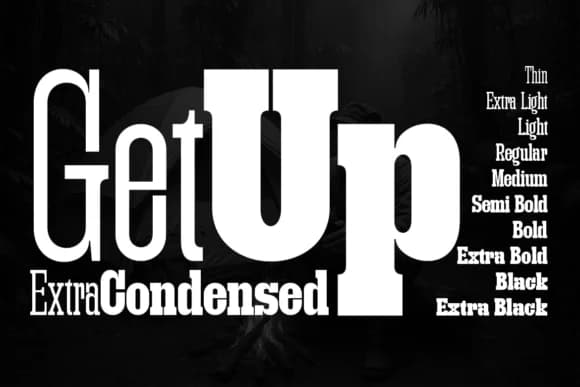
Getup Extra Condensed, designed by Artisans, is a narrow slab serif that delivers maximum visual impact from minimal horizontal real estate. Ultra-compressed letterforms maintain a controlled, technical presence that adapts across editorial spreads, digital interfaces, luxury branding, and industrial design contexts.
The defining strength is sheer capacity: because the typeface compresses horizontally without sacrificing weight or presence, designers can push massive point sizes into layouts where traditional fonts simply won't fit. Cinematic opening title sequences exploit this geometry to command immediate attention, vertical social media ads gain instant visual dominance, and magazine feature spreads anchor layouts with authoritative typography. With 10 weights spanning Thin through Extra Black, you can dial in exact intensity: layer delicate headlines or deploy a heavy monumental statement that remains crisp across all platforms.
Both tech teams and luxury brands gravitate toward this family: the geometric slab serifs feel equally at home in minimal product interfaces and high-fashion campaign typography. Architectural signage, editorial promos, boutique skincare packaging, and premium brand websites all benefit from its confident geometry and rhythmic structure. Download from Creative Fabrica to access the complete weight range and bring this controlled intensity to your next project.
Style & Use Cases
- Overall Style
- Sturdy, Confident, Futuristic
- Use Case
- Headlines, Merch
- Ideal For
- vintage posters, logos, and product packaging
- Pairs With
- a light sans-serif
How to Install Getup Extra Condensed Font
Step-by-step instructions for every platform
- 1Download the Getup Extra Condensed font file (.ttf or .otf).
- 2Locate the downloaded file in your Downloads folder.
- 3Right-click the font file.
- 4Select "Install" to install for the current user, or "Install for all users" to make it available system-wide.
- 5Getup Extra Condensed is now available in Word, Photoshop, Illustrator, and all other apps.
More by Artisans
View all →
Browse fonts by theme
Curated collections →Saw a font in a picture? Identify any font from an image with our free Font Finder.
More Slab Serif Fonts
Browse all →







What pairs well with Getup Extra Condensed Font?
Getup Extra Condensed Font is a slab serif font that shines as a display or heading face. Pair it with a clean sans-serif or serif font for body text — the contrast creates a clear hierarchy while the two styles stay balanced and easy to read.



Getup Extra Condensed Font
by Artisans
Reviewed by the FontBoxDL team · Updated August 2026