 Firefox
 1 / 7
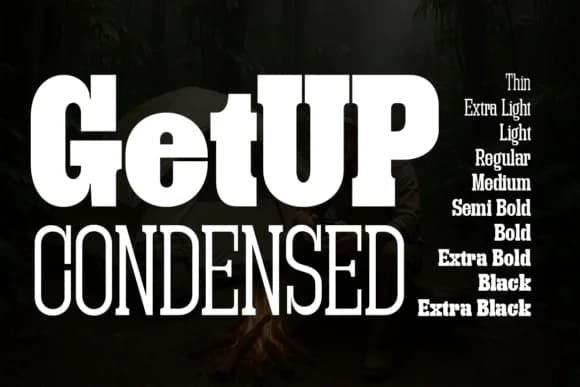
1 / 7About Getup Condensed Font
Strong, architectural, zero visual waste. Getup Condensed by Artisans compresses the signature blocky serifs of the GetUp family into lean, highly readable arrangements. This condensed version packs serious typographic weight into tight spaces, making it ideal when you need maximum presence without sprawl.
The 10 weights span Thin through Extra Black, giving genuine range for hierarchical work. Lighter cuts feel crisp for high-fashion lookbook headers and editorial feature openers, while the bulkier masses carry real authority for craft brewery labels, luxury skincare packaging, and tech startup pitch decks. Its squatter proportions work where traditional serifs feel too open or too fragile. Gallery exhibition posters, minimal book covers, and premium product spec sheets all benefit from its compact structure and unfussy character. The condensed format means you can set body-scale type at sizes that would normally require much larger point counts, making it surprisingly efficient for complex information layouts.
Pair Getup Condensed with a clean geometric sans for captions and running text. It creates hierarchy through weight and proportion rather than style clash, so everything from print collateral to digital branding systems feels sharper and more controlled. Find it on Creative Fabrica and unlock tighter typographic systems built on solid structure.
Style & Use Cases
- Overall Style
- Sturdy, Confident, Futuristic
- Use Case
- Headlines, Merch
- Ideal For
- vintage posters, logos, and product packaging
- Pairs With
- a light sans-serif
How to Install Getup Condensed Font
Step-by-step instructions for every platform
- 1Download the Getup Condensed font file (.ttf or .otf).
- 2Locate the downloaded file in your Downloads folder.
- 3Right-click the font file.
- 4Select "Install" to install for the current user, or "Install for all users" to make it available system-wide.
- 5Getup Condensed is now available in Word, Photoshop, Illustrator, and all other apps.
More by Artisans
View all →
Browse fonts by theme
Curated collections →Saw a font in a picture? Identify any font from an image with our free Font Finder.
More Slab Serif Fonts
Browse all →







What pairs well with Getup Condensed Font?
Getup Condensed Font is a slab serif font that shines as a display or heading face. Pair it with a clean sans-serif or serif font for body text — the contrast creates a clear hierarchy while the two styles stay balanced and easy to read.



Getup Condensed Font
by Artisans
Reviewed by the FontBoxDL team · Updated August 2026