 Firefox
 1 / 9
1 / 9About Flamingo Font
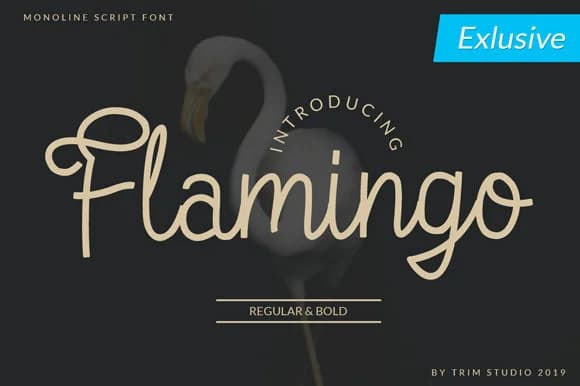
This script breathes a warm, nostalgic energy that feels like stepping into a 1970s corner shop or vintage record store full of character and soul. Flamingo Font, designed by Trim Studio, is a monoline script that balances strong, confident letterforms with genuine elegance, giving your work that coveted vintage character without feeling overwrought or stuck in time.
The typeface shines on speakeasy wine labels, tattoo studio signage, and handwritten-style greeting cards where visual personality truly matters more than sterile perfection. Its monoline construction keeps things legible even at smaller sizes, and the retro aesthetic translates beautifully across vinyl record cover lettering, vintage theater posters, museum gift shop packaging, or custom bookplate designs where a touch of nostalgia enhances the overall composition without drowning everything else out. You get a script that serves the design rather than trying to steal the show.
This font sits quite comfortably within brand identities that lean into character and history. Pair it with a clean geometric sans-serif for supporting text, body copy, and captions, and you'll have a versatile pairing that works across branding systems, single-use pieces, and everything in between. Get it on Creative Fabrica and bring that vibrant script energy to your designs.
Style & Use Cases
- Overall Style
- Elegant, Flowing, Symbol
- Use Case
- Invitations, Branding
- Ideal For
- wedding stationery, greeting cards, and signatures
- Pairs With
- a simple uppercase sans
How to Install Flamingo Font Font
Step-by-step instructions for every platform
- 1Download the Flamingo Font font file (.ttf or .otf).
- 2Locate the downloaded file in your Downloads folder.
- 3Right-click the font file.
- 4Select "Install" to install for the current user, or "Install for all users" to make it available system-wide.
- 5Flamingo Font is now available in Word, Photoshop, Illustrator, and all other apps.
More by Trim Studio
View all →


Browse fonts by theme
Curated collections →Saw a font in a picture? Identify any font from an image with our free Font Finder.
More Script Handwritten Fonts
Browse all →







What pairs well with Flamingo Font?
Flamingo Font is a script font that shines as a display or heading face. Pair it with a clean sans-serif or serif font for body text — the contrast creates a clear hierarchy while the two styles stay balanced and easy to read.



Flamingo Font
by Trim Studio
Reviewed by the FontBoxDL team · Updated June 2026