 Firefox
 1 / 7
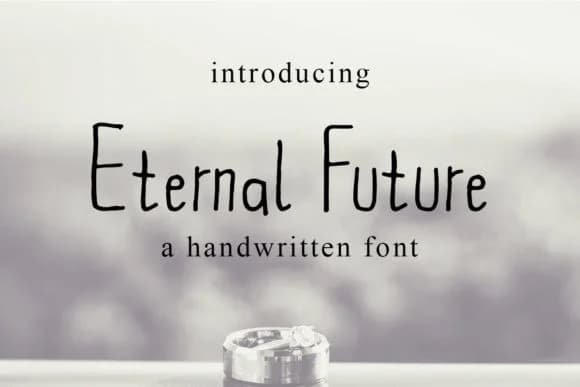
1 / 7About Eternal Future Font
Imagine you're hand-lettering a wedding invitation suite and you want something that captures both personality and contemporary sophistication. Eternal Future, created by densudesign, is a handwritten script that bridges that gap perfectly, sitting between casual and refined. The font carries an unconventional edge, that "weird" aesthetic the designer clearly embraced, while staying readable across all sizes. There's a distinct abstract, almost sketchy quality to its letterforms that brings genuine character and personality without compromising legibility.
This typeface excels at scenarios where personality and boldness drive the design decision: custom Etsy product packaging for indie brands, boutique stationery sets, handmade greeting card suites, and DIY craft signage that needs to stand apart from generic templates. The handwritten warmth prevents it from feeling sterile or stiff, but its angular, stylized strokes keep it from veering into overly precious or delicate territory. That visual equilibrium makes it equally at home on vintage-inspired labels and cutting-edge brand identity projects. Whether you're designing a personalized journal cover or lettering small-batch product boxes, this font maintains its personality without compromising its practical utility.
The weight and presence show beautifully at display sizes, making it especially effective and striking for headlines and focal points in any layout. You'll find it on Creative Fabrica.
Style & Use Cases
- Overall Style
- Elegant, Flowing, Eternal Future
- Use Case
- Invitations, Branding
- Ideal For
- wedding stationery, greeting cards, and signatures
- Pairs With
- a simple uppercase sans
How to Install Eternal Future Font Font
Step-by-step instructions for every platform
- 1Download the Eternal Future Font font file (.ttf or .otf).
- 2Locate the downloaded file in your Downloads folder.
- 3Right-click the font file.
- 4Select "Install" to install for the current user, or "Install for all users" to make it available system-wide.
- 5Eternal Future Font is now available in Word, Photoshop, Illustrator, and all other apps.
More by densudesign
View all →
Browse fonts by theme
Curated collections →Saw a font in a picture? Identify any font from an image with our free Font Finder.
More Script Handwritten Fonts
Browse all →







What pairs well with Eternal Future Font?
Eternal Future Font is a script font that shines as a display or heading face. Pair it with a clean sans-serif or serif font for body text — the contrast creates a clear hierarchy while the two styles stay balanced and easy to read.



Eternal Future Font
by densudesign
Reviewed by the FontBoxDL team · Updated August 2026