
 1 / 5
1 / 5About Enofive Font
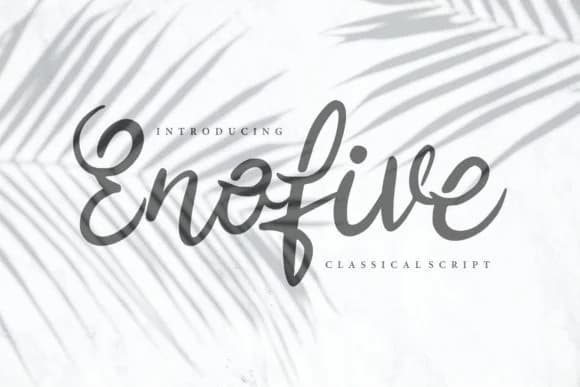
This script feels warm and inviting without sacrificing sophistication. Enofive Font by Vunira takes classical calligraphy as its starting point, then loosens it with the organic flow of modern handwriting, creating something that feels both refined and personal.
The letterforms sit in that sweet spot between formal and friendly, making it an excellent choice for wedding invitation suites, luxury retail packaging, personalized thank you cards, and hand-lettered product labels for small-batch makers and artisan brands. Its graceful strokes have enough character that it reads as intentional and thoughtful rather than purely decorative. This means you can use it as the dominant voice in a layout or pair it with simpler elements without it feeling out of place. Picture it on high-end menus, boutique beauty brand identities, and upscale event stationery, where Enofive brings the kind of refinement that makes clients take notice. The font includes multiple alternates and stylistic variations, giving you flexibility to customize letterforms and add natural rhythm to longer text passages.
Combine Enofive with a clean, minimal sans-serif (something like Montserrat or Inter) when you need body copy, letting the script shine where the design needs drama and personality. Grab it on Creative Fabrica.
Style & Use Cases
- Overall Style
- Elegant, Flowing, Enofive
- Use Case
- Invitations, Branding
- Ideal For
- wedding stationery, greeting cards, and signatures
- Pairs With
- a simple uppercase sans
How to Install Enofive Font Font
Step-by-step instructions for every platform
- 1Download the Enofive Font font file (.ttf or .otf).
- 2Locate the downloaded file in your Downloads folder.
- 3Right-click the font file.
- 4Select "Install" to install for the current user, or "Install for all users" to make it available system-wide.
- 5Enofive Font is now available in Word, Photoshop, Illustrator, and all other apps.
Browse fonts by theme
Curated collections →Saw a font in a picture? Identify any font from an image with our free Font Finder.
More Script Handwritten Fonts
Browse all →







What pairs well with Enofive Font?
Enofive Font is a script font that shines as a display or heading face. Pair it with a clean sans-serif or serif font for body text — the contrast creates a clear hierarchy while the two styles stay balanced and easy to read.



Enofive Font
by Vunira
Reviewed by the FontBoxDL team · Updated September 2026