 Firefox
 1 / 7
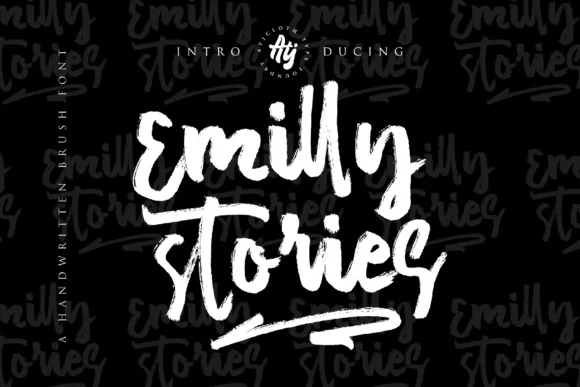
1 / 7About Emilly Stories Font
Emilly Stories by Atjcloth Studio is a textured brush script that captures the organic, hand-drawn character perfect for designers seeking authentic personality in their typography. The font's irregular baseline creates an intentionally imperfect flow that feels like genuine brushwork, bringing warmth and movement to contemporary designs without relying on overly polished aesthetics. This textural quality makes every application feel handcrafted rather than mass-produced.
This script excels in applications where a personal touch matters most. Use it for wedding invitation suites with custom addressing, small-batch cosmetics and skincare labeling, personalized stationery and greeting cards that demand individuality, and calligraphy-inspired social media graphics that stand out in crowded feeds. The included swash variants expand your design flexibility, allowing you to mix letterforms and flourishes for richer visual composition. Whether you're creating delicate packaging designs, book covers with artisanal appeal, or brand identity materials that emphasize handmade quality, this typeface communicates genuine craftsmanship and care to your audience.
Emilly Stories bridges the gap between hand-lettering and digital typography, offering accessibility without sacrificing character. Get Emilly Stories Font on Creative Fabrica and bring authentic brush-drawn aesthetics to your next creative project.
Style & Use Cases
- Overall Style
- Elegant, Flowing, Emilly Stories
- Use Case
- Invitations, Branding
- Ideal For
- wedding stationery, greeting cards, and signatures
- Pairs With
- a simple uppercase sans
How to Install Emilly Stories Font Font
Step-by-step instructions for every platform
- 1Download the Emilly Stories Font font file (.ttf or .otf).
- 2Locate the downloaded file in your Downloads folder.
- 3Right-click the font file.
- 4Select "Install" to install for the current user, or "Install for all users" to make it available system-wide.
- 5Emilly Stories Font is now available in Word, Photoshop, Illustrator, and all other apps.
More by Atjcloth Studio
View all →

Browse fonts by theme
Curated collections →Saw a font in a picture? Identify any font from an image with our free Font Finder.
More Script Handwritten Fonts
Browse all →







What pairs well with Emilly Stories Font?
Emilly Stories Font is a script font that shines as a display or heading face. Pair it with a clean sans-serif or serif font for body text — the contrast creates a clear hierarchy while the two styles stay balanced and easy to read.




Emilly Stories Font
Reviewed by the FontBoxDL team · Updated May 2026