 Firefox
 1 / 8
1 / 8About Ellegia Font
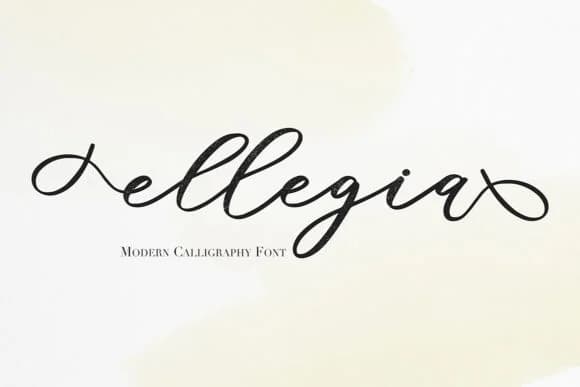
Ellegia by Masha Artifex is a fluid handwritten script that brings genuine character to projects demanding personality and warmth. The typeface features extensive alternate characters, letting designers mix letterforms for authentic hand-penned results. This variation means no two words need look identical, which matters when you want work to feel crafted rather than templated.
This script shines in projects rooted in handmade appeal. Wedding invitation suites benefit from its flowing elegance, with each letter signaling the care behind the event. Etsy product labels gain credibility from authentic letterforms, especially for artisanal brands. Boutique skincare packaging and personalized stationery feel more genuine when they showcase this kind of romantic quality. Buyers respond to those signals of attention and real craftsmanship.
The stroke quality reads like someone actually sat down with a pen and drew each letter, which resonates with people tired of sterile digital typefaces. DIY craft projects, custom greeting cards, and small-batch branding all benefit from this honest approach. There's a refreshing genuineness to Ellegia in a landscape crowded with overly decorative scripts. If you're ready to add real warmth to your next design, grab Ellegia on Creative Fabrica and explore what the full character set offers.
Style & Use Cases
- Overall Style
- Elegant, Flowing, Ellegia
- Use Case
- Invitations, Branding
- Ideal For
- wedding stationery, greeting cards, and signatures
- Pairs With
- a simple uppercase sans
How to Install Ellegia Font Font
Step-by-step instructions for every platform
- 1Download the Ellegia Font font file (.ttf or .otf).
- 2Locate the downloaded file in your Downloads folder.
- 3Right-click the font file.
- 4Select "Install" to install for the current user, or "Install for all users" to make it available system-wide.
- 5Ellegia Font is now available in Word, Photoshop, Illustrator, and all other apps.
More by Masha Artifex
View all →
Browse fonts by theme
Curated collections →Saw a font in a picture? Identify any font from an image with our free Font Finder.
More Script Handwritten Fonts
Browse all →







What pairs well with Ellegia Font?
Ellegia Font is a script font that shines as a display or heading face. Pair it with a clean sans-serif or serif font for body text — the contrast creates a clear hierarchy while the two styles stay balanced and easy to read.



Ellegia Font
Reviewed by the FontBoxDL team · Updated September 2026