 Firefox
 1 / 8
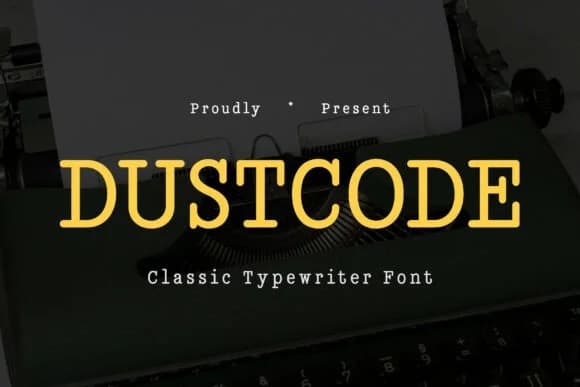
1 / 8About Dustcode Font
Dustcode by Typia Nesia is a slab-serif display font that brings mechanical typewriter aesthetics into contemporary design. The typeface channels the raw, industrial character of mid-century office machines with just enough weathered texture to feel authentic without looking dated.
This font shines on indie press book covers and vintage-inspired event invitations that need retro credibility. It works just as well for craft brewery labels, restaurant menu cards, and any branding where historical weight matters more than trends. Magazine mastheads and grunge-styled headlines benefit from Dustcode's blend of structured letterforms and worn character. The complete character set (uppercase, lowercase, numbers, and punctuation) means you can set everything from body copy to large display treatments, though its personality really shines at bigger sizes where the texture reads properly.
What sets Dustcode apart is how it manages to feel both nostalgic and current. The chunky slab serifs give it presence and authority, while the imperfect edges add warmth that feels handmade rather than clinical. Put it to work on vintage packaging, business cards for established studios, or branding that needs old-school punch. It delivers without requiring heavy layering or effects to make the concept land. Find Dustcode on Creative Fabrica and start bringing that typewriter-era character to your work.
Style & Use Cases
- Overall Style
- Sturdy, Confident, Classic
- Use Case
- Headlines, Merch
- Ideal For
- vintage posters, logos, and product packaging
- Pairs With
- a light sans-serif
How to Install Dustcode Font
Step-by-step instructions for every platform
- 1Download the Dustcode font file (.ttf or .otf).
- 2Locate the downloaded file in your Downloads folder.
- 3Right-click the font file.
- 4Select "Install" to install for the current user, or "Install for all users" to make it available system-wide.
- 5Dustcode is now available in Word, Photoshop, Illustrator, and all other apps.
More by Typia Nesia
View all →
Browse fonts by theme
Curated collections →Saw a font in a picture? Identify any font from an image with our free Font Finder.
More Slab Serif Fonts
Browse all →







What pairs well with Dustcode Font?
Dustcode Font is a slab serif font that shines as a display or heading face. Pair it with a clean sans-serif or serif font for body text — the contrast creates a clear hierarchy while the two styles stay balanced and easy to read.



Dustcode Font
by Typia Nesia
Reviewed by the FontBoxDL team · Updated August 2026