 Firefox
 1 / 9
1 / 9About Dungeon Font
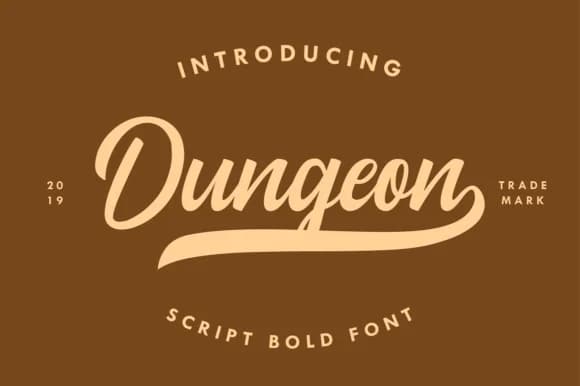
Dungeon by 78soeef Design is a classic script that channels genuine vintage character and refinement. These letterforms carry the elegance of mid-century advertising from an era when typography was bold, intentional, and made to last. This script strikes a balance between nostalgic appeal and legibility, making it genuinely useful for real projects rather than just inspiration boards.
The strongest applications are vintage whiskey label designs, where the refined strokes feel right alongside leather textures and metallic accents. Speakeasy-themed event posters come alive with this style, and it lends authentic character to branding for antique revival shops or craft product labels that honor their retro inspiration without feeling like costume design. Wedding stationery with a period-correct retro twist is another natural fit, especially when you're aiming for that 1920s through 1950s aesthetic. Restoration project signage also benefits from the authentic weight it brings.
The font maintains consistent letterform quality across its full glyph set and supports extended language characters, so you're not limited in deployment. At any size, from large display applications to medium text, the weight remains stable and refined. Dungeon brings authentic vintage energy to projects where that retro sensibility genuinely belongs. Get it on Creative Fabrica and add it to your collection.
Style & Use Cases
- Overall Style
- Elegant, Flowing
- Use Case
- Invitations, Branding
- Ideal For
- wedding stationery, greeting cards, and signatures
- Pairs With
- a simple uppercase sans
How to Install Dungeon Font Font
Step-by-step instructions for every platform
- 1Download the Dungeon Font font file (.ttf or .otf).
- 2Locate the downloaded file in your Downloads folder.
- 3Right-click the font file.
- 4Select "Install" to install for the current user, or "Install for all users" to make it available system-wide.
- 5Dungeon Font is now available in Word, Photoshop, Illustrator, and all other apps.
More by 78soeef Design
View all →
Browse fonts by theme
Curated collections →Saw a font in a picture? Identify any font from an image with our free Font Finder.
More Script Handwritten Fonts
Browse all →







What pairs well with Dungeon Font?
Dungeon Font is a script font that shines as a display or heading face. Pair it with a clean sans-serif or serif font for body text — the contrast creates a clear hierarchy while the two styles stay balanced and easy to read.



Dungeon Font
Reviewed by the FontBoxDL team · Updated September 2026