 Firefox
 1 / 7
1 / 7About Duakata Font
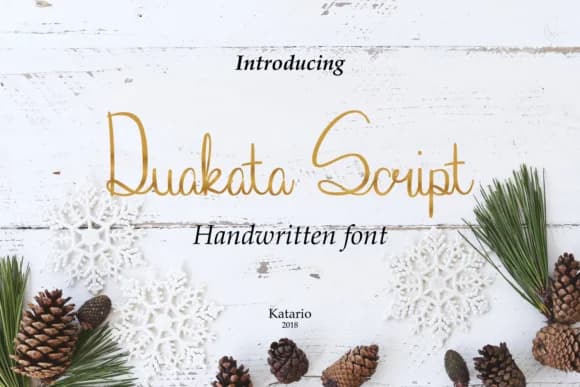
Duakata by Katario Studio is a flowing handwritten script that brings an organic, approachable energy to contemporary typography. With its natural curves and informal character, this font excels at humanizing modern designs and creating genuine personal connections between brands and audiences. The inherent warmth of its letterforms invites viewers to engage with content on a more intimate, relatable level.
Whether you're designing wedding invitation suites, creating Etsy product labels, developing boutique skincare packaging, or hand-lettering DIY craft signs, Duakata adapts beautifully to projects seeking warmth and authenticity. The font's casual sensibility pairs seamlessly with structured sans serif typefaces, striking a compelling balance between playfulness and sophistication. It includes comprehensive glyphs and multilingual language support, making it versatile for designers working on international projects and campaigns.
The gentle, handmade aesthetic of Duakata resonates particularly well with feminine branding initiatives, lifestyle content creation, and projects targeting audiences who value artisanal quality and personal craftsmanship. From independent label design to small business identity work, this script provides the tactile, human touch that distinguishes contemporary brands in a digital landscape. Discover Duakata on Creative Fabrica and add handwritten character to your next creative project.
Style & Use Cases
- Overall Style
- Elegant, Flowing, Duakata
- Use Case
- Invitations, Branding
- Ideal For
- wedding stationery, greeting cards, and signatures
- Pairs With
- a simple uppercase sans
How to Install Duakata Font Font
Step-by-step instructions for every platform
- 1Download the Duakata Font font file (.ttf or .otf).
- 2Locate the downloaded file in your Downloads folder.
- 3Right-click the font file.
- 4Select "Install" to install for the current user, or "Install for all users" to make it available system-wide.
- 5Duakata Font is now available in Word, Photoshop, Illustrator, and all other apps.
More by Katario Studio
View all →

Browse fonts by theme
Curated collections →Saw a font in a picture? Identify any font from an image with our free Font Finder.
More Script Handwritten Fonts
Browse all →







What pairs well with Duakata Font?
Duakata Font is a script font that shines as a display or heading face. Pair it with a clean sans-serif or serif font for body text — the contrast creates a clear hierarchy while the two styles stay balanced and easy to read.



Duakata Font
Reviewed by the FontBoxDL team · Updated May 2026