 Firefox
 1 / 8
1 / 8About Dodgy Distort Font
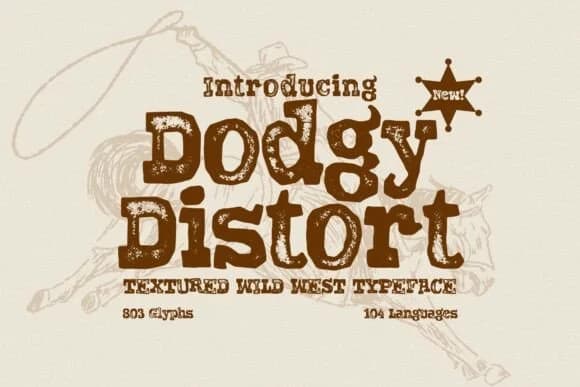
Dodgy Distort, designed by HipFonts, captures the raw appeal of frontier typography through deliberately warped letterforms and built-in surface texture that feels genuinely worn. Each character looks authentically aged, as if stamped into weathered wood or leather, bringing instant rugged personality to your designs without requiring extra distressing or texture work in your editor.
The typeface excels in any project where imperfection strengthens the overall message rather than undermining it. Wanted poster designs gain real credibility from its crooked, uneven character, while vintage saloon signage benefits from the grit and age built into every letter. Rustic badge layouts, craft labels, antique store posters, and DIY event signage all lean on this distressed personality to feel authentic. With 803 glyphs spanning 104 languages, you'll find substantial flexibility whether working on regional projects or international campaigns.
This is the typeface for designers building authentic Western brand experiences: retro merchandise packaging with genuine character, Etsy shop branding that reads as frontier-inspired, DIY signage projects that should look genuinely aged rather than digitally constructed, and cowboy-era event materials that need that worn feel. The built-in texture does heavy lifting so you don't waste time layering effects yourself. Find Dodgy Distort on Creative Fabrica whenever you need typography that brings real frontier roughness to your work.
Style & Use Cases
- Overall Style
- Sturdy, Confident, Dodgy Distor Font
- Use Case
- Headlines, Merch
- Ideal For
- vintage posters, logos, and product packaging
- Pairs With
- a light sans-serif
How to Install Dodgy Distort Font
Step-by-step instructions for every platform
- 1Download the Dodgy Distort font file (.ttf or .otf).
- 2Locate the downloaded file in your Downloads folder.
- 3Right-click the font file.
- 4Select "Install" to install for the current user, or "Install for all users" to make it available system-wide.
- 5Dodgy Distort is now available in Word, Photoshop, Illustrator, and all other apps.
More by HipFonts
View all →
Browse fonts by theme
Curated collections →Saw a font in a picture? Identify any font from an image with our free Font Finder.
More Slab Serif Fonts
Browse all →







What pairs well with Dodgy Distort Font?
Dodgy Distort Font is a slab serif font that shines as a display or heading face. Pair it with a clean sans-serif or serif font for body text — the contrast creates a clear hierarchy while the two styles stay balanced and easy to read.



Dodgy Distort Font
by HipFonts
Reviewed by the FontBoxDL team · Updated August 2026