 Firefox
 1 / 8
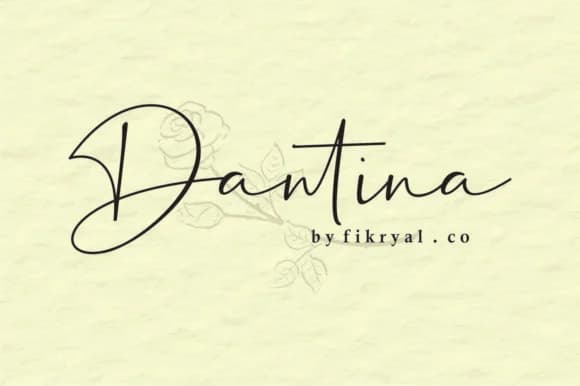
1 / 8About Dantina Font
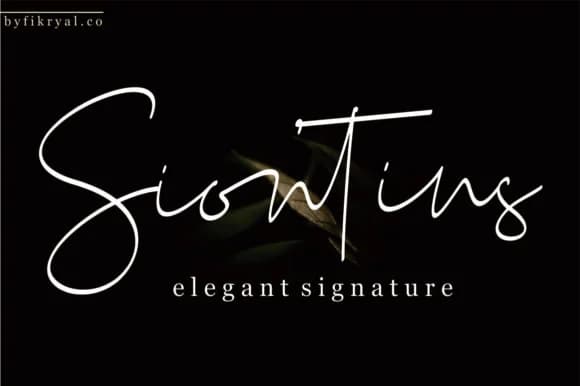
Dantina by Fikryal Studio is a flowing handwritten script that brings genuine warmth to projects needing a personal touch. The letterforms feel loose and organic, with the kind of natural rhythm that makes viewers feel like someone sat down with a pen and wrote this by hand, not a computer program generating letters.
This typeface earns its place in wedding invitations, save-the-date cards, and engagement announcements, where that human quality is exactly what clients are paying premium prices for. Boutique cosmetics packaging, handmade craft labels, DIY event signage, and small-business branding all benefit from the approachable, sketchy character Dantina brings to the table. It works equally well in social media graphics, where its authenticity stands out against the sterile sans-serifs most brands default to. Even at smaller sizes, the letterforms maintain enough definition to stay readable, which means it functions just as well on screen as it does printed on cardstock or product tags.
If you're building a brand or creating work that needs to feel genuinely handmade without the technical inconsistency issues that come with actual hand-lettering, Dantina deserves a place in your toolkit. You'll find it ready to download on Creative Fabrica.
Style & Use Cases
- Overall Style
- Elegant, Flowing, Dantina
- Use Case
- Invitations, Branding
- Ideal For
- wedding stationery, greeting cards, and signatures
- Pairs With
- a simple uppercase sans
How to Install Dantina Font Font
Step-by-step instructions for every platform
- 1Download the Dantina Font font file (.ttf or .otf).
- 2Locate the downloaded file in your Downloads folder.
- 3Right-click the font file.
- 4Select "Install" to install for the current user, or "Install for all users" to make it available system-wide.
- 5Dantina Font is now available in Word, Photoshop, Illustrator, and all other apps.
More by Fikryal Studio
View all →
Browse fonts by theme
Curated collections →Saw a font in a picture? Identify any font from an image with our free Font Finder.
More Script Handwritten Fonts
Browse all →







What pairs well with Dantina Font?
Dantina Font is a script font that shines as a display or heading face. Pair it with a clean sans-serif or serif font for body text — the contrast creates a clear hierarchy while the two styles stay balanced and easy to read.



Dantina Font
Reviewed by the FontBoxDL team · Updated June 2026