 Firefox
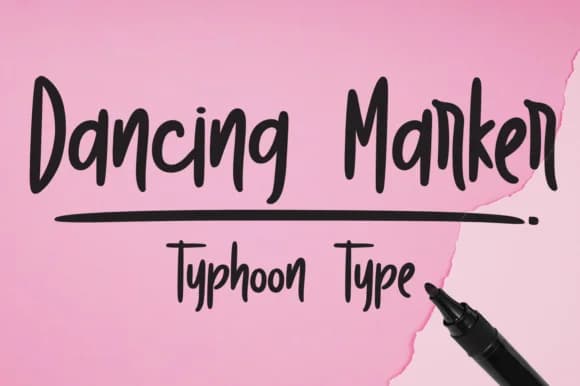
About Dancing Marker Font
Dancing Marker Font by Typhoon Type™ is a hand-lettered script that captures the genuine, organic feel of marker on paper. With its flowing letterforms and spontaneous character, this typeface brings authenticity to contemporary designs without sacrificing legibility, making it equally at home on formal stationery or playful packaging designs. The font's brush-like strokes and natural rhythm work beautifully across multiple practical use cases and applications. Wedding invitation suites benefit from its warm, personalized touch, ideal for couples seeking genuine character and personality in their ceremony details and stationery. Boutique cosmetics and skincare brands discover that Dancing Marker's expressive quality brings visual warmth and personality to label designs with understated sophistication. Similarly, craft product packaging and DIY-focused Etsy shops leverage the font's approachable, friendly nature to build customer trust and effectively differentiate themselves in crowded online markets. Beyond branding, the font excels in editorial and social contexts, event signage, personalized greeting cards, and informal social media headers all gain visual interest from its spontaneous, hand-drawn quality. Whether scaling up for large-format prints or down for digital displays, Dancing Marker's consistent letterforms maintain readable clarity without losing their distinctive, characterful appeal. Discover Dancing Marker Font on Creative Fabrica and bring authentic hand-lettered expression to your next creative project.
Style & Use Cases
- Overall Style
- Elegant, Flowing, Dancing Marker
- Use Case
- Invitations, Branding
- Ideal For
- wedding stationery, greeting cards, and signatures
- Pairs With
- a simple uppercase sans
How to Install Dancing Marker Font Font
Step-by-step instructions for every platform
- 1Download the Dancing Marker Font font file (.ttf or .otf).
- 2Locate the downloaded file in your Downloads folder.
- 3Right-click the font file.
- 4Select "Install" to install for the current user, or "Install for all users" to make it available system-wide.
- 5Dancing Marker Font is now available in Word, Photoshop, Illustrator, and all other apps.
More by Typhoon Type™
View all →
Browse fonts by theme
Curated collections →Saw a font in a picture? Identify any font from an image with our free Font Finder.
More Script Handwritten Fonts
Browse all →







What pairs well with Dancing Marker Font?
Dancing Marker Font is a script font that shines as a display or heading face. Pair it with a clean sans-serif or serif font for body text — the contrast creates a clear hierarchy while the two styles stay balanced and easy to read.



Dancing Marker Font
Reviewed by the FontBoxDL team · Updated May 2026