 Firefox
 1 / 8
1 / 8About Daisuke Font
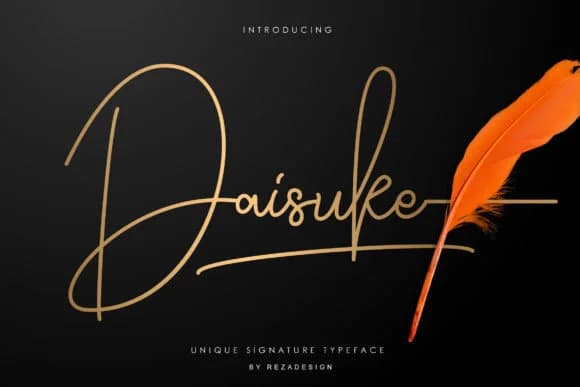
Daisuke, created by Grezline Studio, captures the flowing rhythm of natural handwriting with an understated grace that feels both accomplished and approachable. The letterforms have that delicate, confident quality you get from a well-practiced hand, without the wobble or excessive flourish that can date a script font. There's real personality here, grounded in the letters' natural proportions and spacing, which gives the whole typeface a sense of calm confidence.
This script works beautifully for projects that need genuine character without pretense. Wedding invitation suites feel immediately more intimate with Daisuke's touch. Personal branding on product labels for small cosmetics makers, boutique stationery lines, and artisanal food packaging all benefit from its human warmth. It handles greeting cards and hand-lettered quote graphics for social media, DIY craft signage, and even personal logo work without looking overwrought or trying too hard. The balance between elegance and approachability makes it perform across scales, whether you're setting it large for a title or smaller for supporting text.
Daisuke appeals to designers and makers who want their work to feel considered and genuinely human. If you're crafting something that needs personality with just enough restraint, this script is worth exploring. Find it on Creative Fabrica.
Style & Use Cases
- Overall Style
- Elegant, Flowing, Daisuke
- Use Case
- Invitations, Branding
- Ideal For
- wedding stationery, greeting cards, and signatures
- Pairs With
- a simple uppercase sans
How to Install Daisuke Font Font
Step-by-step instructions for every platform
- 1Download the Daisuke Font font file (.ttf or .otf).
- 2Locate the downloaded file in your Downloads folder.
- 3Right-click the font file.
- 4Select "Install" to install for the current user, or "Install for all users" to make it available system-wide.
- 5Daisuke Font is now available in Word, Photoshop, Illustrator, and all other apps.
More by Grezline Studio
View all →
Browse fonts by theme
Curated collections →Saw a font in a picture? Identify any font from an image with our free Font Finder.
More Script Handwritten Fonts
Browse all →







What pairs well with Daisuke Font?
Daisuke Font is a script font that shines as a display or heading face. Pair it with a clean sans-serif or serif font for body text — the contrast creates a clear hierarchy while the two styles stay balanced and easy to read.



Daisuke Font
Reviewed by the FontBoxDL team · Updated August 2026