 Firefox
 1 / 4
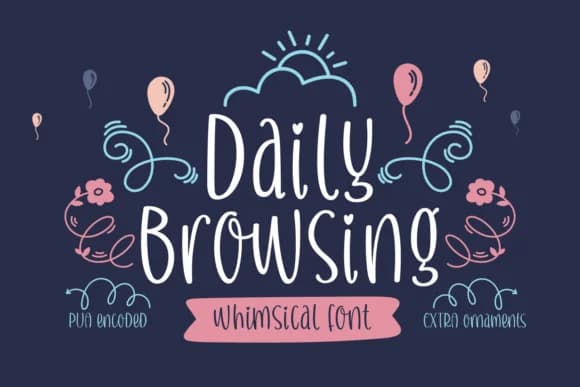
1 / 4About Daily Browsing Font
Imagine labeling a hand-bound journal, penning an invitation, or drafting a handwritten quote for social media. Daily Browsing, designed by Situjuh, is a script typeface that captures the space between relaxed warmth and polished craft.
This font was built for personal projects demanding genuine handwritten character. Wedding invitation suites benefit from its informal, intimate touch, as do Etsy product labels where customers expect artisanal details. Recipe cards, greeting cards, custom monogram designs, and handwritten quote graphics showcase the typeface's conversational personality well. Small-batch cosmetic packaging and business card designs also pair nicely with its friendly but refined sensibility. The letterforms carry enough visual interest to draw attention without sacrificing readability at different sizes and applications.
What makes this typeface work across so many uses is its balance. It resists looking trendy or stiff, which means your designs feel timeless rather than dated. The handwritten quality never feels forced or artificial, even when scaled up or used in unexpected places. Try it on personal correspondence, boutique branding work, or DIY craft signage, and you'll find Daily Browsing delivers that approachable, human quality clients and viewers respond to. Grab it from Creative Fabrica and bring this character to your work.
Style & Use Cases
- Overall Style
- Elegant, Flowing, Daily Browsing
- Use Case
- Invitations, Branding
- Ideal For
- wedding stationery, greeting cards, and signatures
- Pairs With
- a simple uppercase sans
How to Install Daily Browsing Font Font
Step-by-step instructions for every platform
- 1Download the Daily Browsing Font font file (.ttf or .otf).
- 2Locate the downloaded file in your Downloads folder.
- 3Right-click the font file.
- 4Select "Install" to install for the current user, or "Install for all users" to make it available system-wide.
- 5Daily Browsing Font is now available in Word, Photoshop, Illustrator, and all other apps.

Browse fonts by theme
Curated collections →Saw a font in a picture? Identify any font from an image with our free Font Finder.
More Script Handwritten Fonts
Browse all →







What pairs well with Daily Browsing Font?
Daily Browsing Font is a script font that shines as a display or heading face. Pair it with a clean sans-serif or serif font for body text — the contrast creates a clear hierarchy while the two styles stay balanced and easy to read.



Daily Browsing Font
by Situjuh
Reviewed by the FontBoxDL team · Updated August 2026