 Firefox
 1 / 5
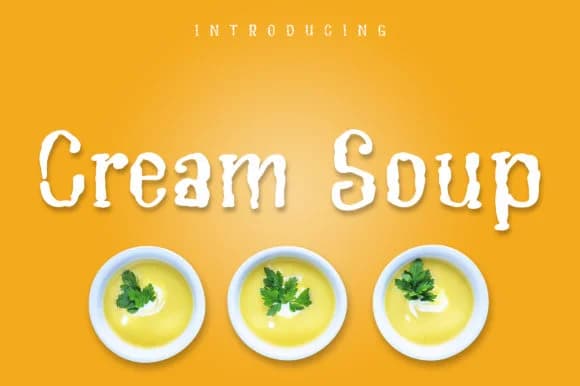
1 / 5About Cream Soup Font
Picture a children's book where the narration bounces off the page in rounded, playful letters full of character. Cream Soup Font, designed by Royaltype, brings that same whimsical energy to any project that needs personality and life. This script-handwritten typeface balances polished kerning with naturally frizzy lines that read instantly as warm, approachable, and genuinely human.
It's built for work where personality matters most. Food and beverage labels feel at home with Cream Soup's creamy letterforms, giving them a handmade quality that catches eyes on shelves and makes customers smile. Comic strips and speech bubbles come alive in these curves. Coloring book pages, greeting cards, children's activity books, and comic-style illustrations all gain visual cohesion when set in this typeface. Merchandise designers reach for it too, finding it works equally well on t-shirt graphics, mug wraps, and sticker labels that need genuine charm without looking corporate or sanitized.
Available in weights from slim to bold, Cream Soup lets you dial in exactly the right prominence for whatever layout you're building. That range prevents it from being a one-trick novelty font. Get Cream Soup on Creative Fabrica and bring warmth to your next design.
Style & Use Cases
- Overall Style
- Elegant, Flowing, Cartoon Font Family
- Use Case
- Invitations, Branding
- Ideal For
- wedding stationery, greeting cards, and signatures
- Pairs With
- a simple uppercase sans
How to Install Cream Soup Font Font
Step-by-step instructions for every platform
- 1Download the Cream Soup Font font file (.ttf or .otf).
- 2Locate the downloaded file in your Downloads folder.
- 3Right-click the font file.
- 4Select "Install" to install for the current user, or "Install for all users" to make it available system-wide.
- 5Cream Soup Font is now available in Word, Photoshop, Illustrator, and all other apps.

Browse fonts by theme
Curated collections →Saw a font in a picture? Identify any font from an image with our free Font Finder.
More Script Handwritten Fonts
Browse all →







What pairs well with Cream Soup Font?
Cream Soup Font is a script font that shines as a display or heading face. Pair it with a clean sans-serif or serif font for body text — the contrast creates a clear hierarchy while the two styles stay balanced and easy to read.



Cream Soup Font
by Royaltype
Reviewed by the FontBoxDL team · Updated June 2026