 Firefox
 1 / 5
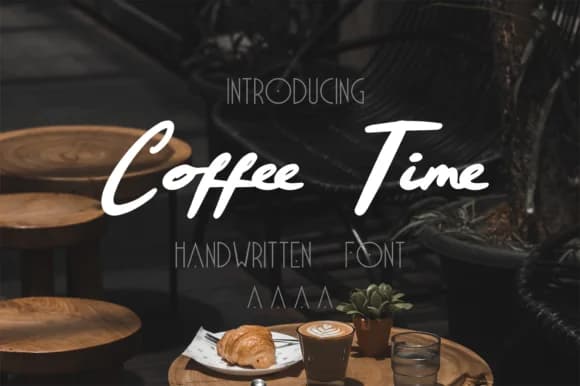
1 / 5About Coffee Time Font
Coffee Time Font by pandastock is a handwritten script with real personality and warmth. This typeface brings a distinctly human touch to any project, capturing that cozy, approachable feeling you want when working in food and beverage design. The informal letterforms make text feel naturally written, not mechanically rendered.
If you're creating café menus and signage, this font delivers authenticity that printed type can't match. Coffee shop social media posts gain character and relatability when you use letterforms this friendly. Handwritten-style packaging for home roasters and artisanal coffee producers benefits from the approachable quality here. Custom labels for specialty bean blends, tea canisters, and beverage products all work beautifully with this script. Even gift tags and small stickers for cafés gain polish and distinction through thoughtful typography.
The font extends well beyond coffee branding, though. Small business owners and product makers rely on scripts like this for product labels, window signage, and point-of-sale materials. Illustrators and designers pair handwritten fonts with hand-drawn elements on book covers, poster designs, and editorial layouts. When you need your audience to feel a personal connection to your work, letterforms this natural and casual do the heavy lifting. Coffee Time brings genuine warmth to any design that calls for personality.
Add Coffee Time Font to your library on Creative Fabrica.
Style & Use Cases
- Overall Style
- Elegant, Flowing, Coffee Time
- Use Case
- Invitations, Branding
- Ideal For
- wedding stationery, greeting cards, and signatures
- Pairs With
- a simple uppercase sans
How to Install Coffee Time Font Font
Step-by-step instructions for every platform
- 1Download the Coffee Time Font font file (.ttf or .otf).
- 2Locate the downloaded file in your Downloads folder.
- 3Right-click the font file.
- 4Select "Install" to install for the current user, or "Install for all users" to make it available system-wide.
- 5Coffee Time Font is now available in Word, Photoshop, Illustrator, and all other apps.
More by pandastock
View all →


Browse fonts by theme
Curated collections →Saw a font in a picture? Identify any font from an image with our free Font Finder.
More Script Handwritten Fonts
Browse all →







What pairs well with Coffee Time Font?
Coffee Time Font is a script font that shines as a display or heading face. Pair it with a clean sans-serif or serif font for body text — the contrast creates a clear hierarchy while the two styles stay balanced and easy to read.



Coffee Time Font
by pandastock
Reviewed by the FontBoxDL team · Updated June 2026