
 1 / 6
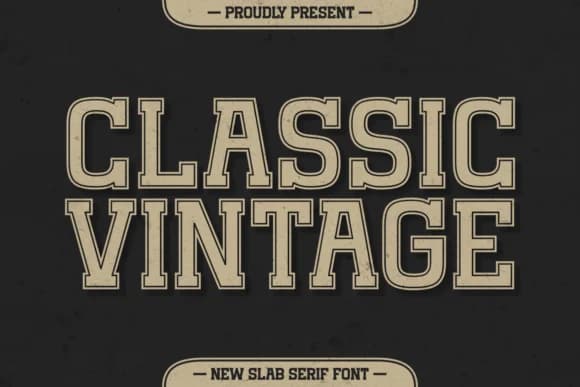
1 / 6About Classic Vintage Font
Classic Vintage by Refy (7NTypes) is a sturdy slab-serif with genuine retro charm and athletic presence that works reliably across design projects of every scale. The letters feel substantial and confident, hitting that balance between nostalgic warmth and clean modern function that's surprisingly difficult to find in a single typeface. Built with multilingual support and a full set of accented characters, international work presents no workarounds needed. Wedding invitation suites, custom apparel hangtags, boutique skincare boxes, and hand-lettered mug designs all gain real presence with this typeface.
Designers reach for Classic Vintage when they want authenticity without the stiffness that often comes with display faces, making it equally natural on event posters, craft market signage, and business logos that need genuine personality rather than polish. The weight and presence read commanding in headlines and drop gracefully to smaller text on labels and embroidered pieces. Logotype work and promotional collateral both translate smoothly through these balanced, purposeful letterforms that maintain clarity across every size and application.
There's real substance here: this typeface captures that vintage spirit everyone seeks without landing tired or clichéd. Get Classic Vintage on Creative Fabrica and see what you can build with it.
Style & Use Cases
- Overall Style
- Sturdy, Confident, Slab Serif Font
- Use Case
- Headlines, Merch
- Ideal For
- vintage posters, logos, and product packaging
- Pairs With
- a light sans-serif
How to Install Classic Vintage Font
Step-by-step instructions for every platform
- 1Download the Classic Vintage font file (.ttf or .otf).
- 2Locate the downloaded file in your Downloads folder.
- 3Right-click the font file.
- 4Select "Install" to install for the current user, or "Install for all users" to make it available system-wide.
- 5Classic Vintage is now available in Word, Photoshop, Illustrator, and all other apps.
More by Refy (7NTypes)
View all →

Browse fonts by theme
Curated collections →Saw a font in a picture? Identify any font from an image with our free Font Finder.
More Slab Serif Fonts
Browse all →







What pairs well with Classic Vintage Font?
Classic Vintage Font is a slab serif font that shines as a display or heading face. Pair it with a clean sans-serif or serif font for body text — the contrast creates a clear hierarchy while the two styles stay balanced and easy to read.



Classic Vintage Font
Reviewed by the FontBoxDL team · Updated September 2026