
 1 / 5
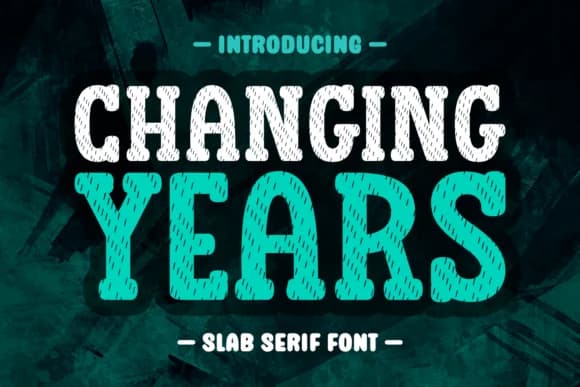
1 / 5About Changing Years Font
Picture a carefully designed greeting card arriving in the mail, or a hand-lettered product label catching an eye on a boutique shelf. That's where Changing Years, a distinctive slab serif from Refy (7NTypes), earns its keep. The typeface brings together the sturdy geometry of slab serifs with an engaging, slightly expressive character that feels crafted rather than mechanical, giving even straightforward layouts a sense of personality.
This font opens up genuine design possibilities across craft work, apparel projects, and brand identity. Wedding invitation suites benefit from its warmth and character, while event signage displays its confident presence at any scale. Coffee mug lettering takes on a personal, considered feel, product packaging for small cosmetics or artisan goods gains authentic character, and embroidered designs work surprisingly well because the forms remain clear even when stitched into fabric. Logotypes built from Changing Years carry that handmade credibility that clients increasingly expect. The multilingual character set with accented letter support means you can use it for international projects without reaching for a backup font.
Changing Years works equally well at display sizes and smaller applications, reading with genuine personality in both contexts. Get it from Creative Fabrica when you need a slab serif that actually contributes something distinctive to your design work.
Style & Use Cases
- Overall Style
- Sturdy, Confident, Slab Serif Font
- Use Case
- Headlines, Merch
- Ideal For
- vintage posters, logos, and product packaging
- Pairs With
- a light sans-serif
How to Install Changing Years Font
Step-by-step instructions for every platform
- 1Download the Changing Years font file (.ttf or .otf).
- 2Locate the downloaded file in your Downloads folder.
- 3Right-click the font file.
- 4Select "Install" to install for the current user, or "Install for all users" to make it available system-wide.
- 5Changing Years is now available in Word, Photoshop, Illustrator, and all other apps.
More by Refy (7NTypes)
View all →

Browse fonts by theme
Curated collections →Saw a font in a picture? Identify any font from an image with our free Font Finder.
More Slab Serif Fonts
Browse all →







What pairs well with Changing Years Font?
Changing Years Font is a slab serif font that shines as a display or heading face. Pair it with a clean sans-serif or serif font for body text — the contrast creates a clear hierarchy while the two styles stay balanced and easy to read.



Changing Years Font
Reviewed by the FontBoxDL team · Updated September 2026