 Firefox
 1 / 5
1 / 5About Citrus Font
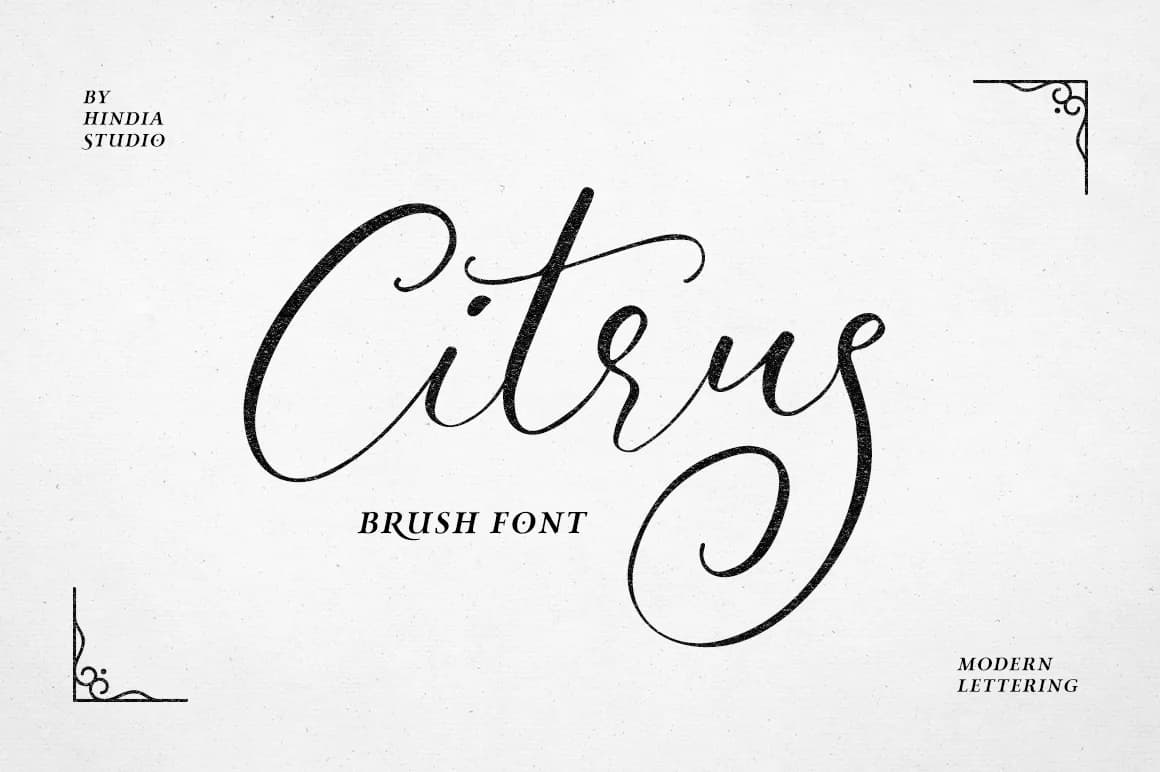
Citrus Font by Hindia Studio is a flowing script that combines warmth with refined sophistication. Its organic letterforms and graceful curves create an approachable elegance suited to both intimate personal projects and polished professional work. The natural rhythm flowing through each character establishes authenticity and genuine personality, making it distinctly appealing across contemporary design applications where handcrafted sensibility matters most.
Citrus excels in specialized applications that demand both approachability and visual refinement. Picture luxury cosmetics packaging where delicate letterforms enhance premium positioning, wedding invitation suites that welcome guests with genuine warmth, boutique restaurant branding that conveys culinary expertise and care, or handmade craft labels for artisan goods. The font's multiple alternate characters add significant depth and customization potential, enabling designers to create meaningful variations within projects without switching typefaces. These alternates allow precise control over visual hierarchy and emphasis, transforming text into layered, intentional compositions that feel distinctly personal.
The interplay between the script's friendly nature and its sophisticated execution makes Citrus particularly valuable for brands seeking to balance approachability with premium positioning. Explore the creative possibilities this typeface offers through Creative Fabrica.
Style & Use Cases
- Overall Style
- Elegant, Flowing, Popular
- Use Case
- Invitations, Branding
- Ideal For
- wedding stationery, greeting cards, and signatures
- Pairs With
- a simple uppercase sans
How to Install Citrus Font Font
Step-by-step instructions for every platform
- 1Download the Citrus Font font file (.ttf or .otf).
- 2Locate the downloaded file in your Downloads folder.
- 3Right-click the font file.
- 4Select "Install" to install for the current user, or "Install for all users" to make it available system-wide.
- 5Citrus Font is now available in Word, Photoshop, Illustrator, and all other apps.
More by Hindia Studio
View all →

Browse fonts by theme
Curated collections →Saw a font in a picture? Identify any font from an image with our free Font Finder.
More Script Handwritten Fonts
Browse all →







What pairs well with Citrus Font?
Citrus Font is a script font that shines as a display or heading face. Pair it with a clean sans-serif or serif font for body text — the contrast creates a clear hierarchy while the two styles stay balanced and easy to read.



Citrus Font
Reviewed by the FontBoxDL team · Updated May 2026